
Does CVS Fax? Cost & Alternatives
CVS doesn't offer fax services, but FedEx Office, The UPS Store, and online services like ThirtyFax do. This guide covers costs, speeds, and when to use each.
Quick Verdict
No, CVS does not offer fax services at any of its locations. While CVS stores provide pharmacy services, retail products, and UPS package pickup, faxing isn’t part of their customer offerings. If you need to send a fax near a CVS, you’ll need to use a nearby retail store like FedEx Office, an online fax service, or check your local library for free options.
Does CVS Have a Fax Machine for Customers?
No, CVS does not provide fax machines or fax services for customer use.
CVS’s official store services include UPS package handling, pharmacy support, and photo printing—but faxing isn’t listed. This applies to all CVS locations nationwide. While some CVS pharmacies may use fax machines internally for prescription transfers or insurance authorization, those machines aren’t available for public use.
Why CVS Doesn’t Offer Fax Services
CVS focuses on pharmacy, health services, and convenience retail rather than business or office services.
Here’s why faxing isn’t part of CVS’s model:
- Operational priorities — CVS stores are designed around pharmacy workflows, retail inventory, and healthcare partnerships like MinuteClinic, not document transmission services
- Low demand — In-store faxing has declined sharply as customers shifted to email, cloud storage, and mobile document apps
- Better alternatives nearby — Dedicated office service providers like FedEx Office and The UPS Store already serve the faxing market more effectively

Best Alternatives to Faxing at CVS
Here are practical options for sending faxes when CVS isn’t available.
Retail Stores With Fax Services
| Store Name | Fax Cost Per Page | Availability Notes |
|---|---|---|
| FedEx Office | Varies by location | Call ahead for pricing; available at locations with self-service copiers |
| The UPS Store | Varies by location | Available at 5,500+ locations; supports sending and receiving |
| Office Depot OfficeMax | Varies by location | Self-service fax available alongside print/scan |
FedEx Office and The UPS Store work best for urgent single-page faxes when you’re already running errands. Office Depot is a solid option if you need to print or scan documents before faxing.
Online Fax Services
Online fax services let you send faxes from your phone or computer without visiting a store.
| Service Name | Monthly Cost | Pages Included | Key Features |
|---|---|---|---|
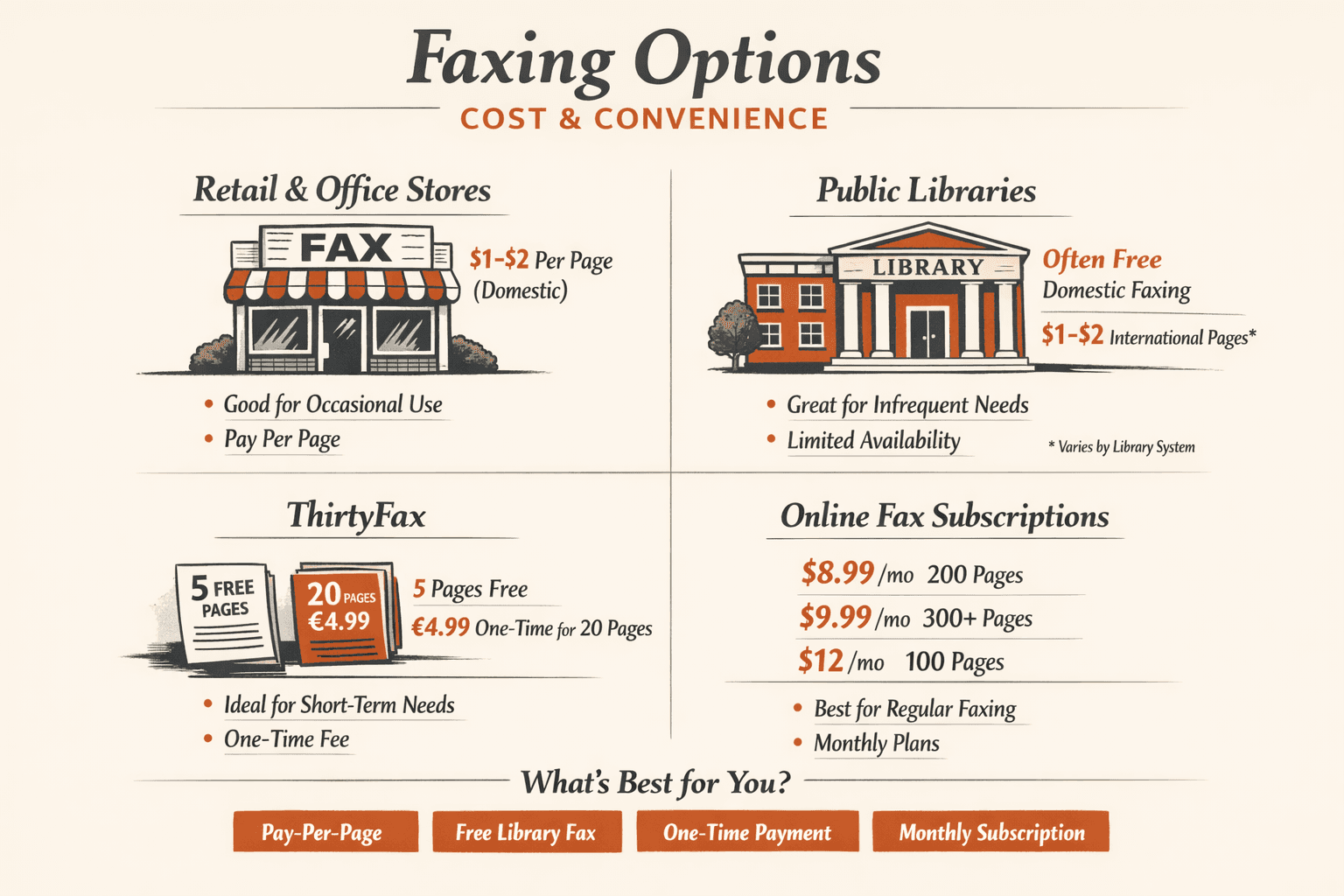
| ThirtyFax | Free or €4.99 one-time | 5 or 20 pages | No account required, no subscription, transparent pricing |
| Fax.Plus | $8.99 | 200 pages | Modern UI, cloud integrations, HIPAA available |
| Dropbox Fax | $9.99 | 300+ pages | Cloud document integrations, 30-day trial |
| MyFax | $12 | 100 pages | Email/web/mobile access, 14-day trial |
Online services make more sense than retail locations when you’re faxing from home, need privacy for sensitive documents, or send faxes more than once a month. ThirtyFax is the fastest option for one-time faxing—no account, no subscription, just upload and send.

Office Supply Stores
FedEx Office, The UPS Store, and Office Depot OfficeMax are dedicated fax service providers with extended hours and document preparation services.
These locations typically offer:
- Self-service fax machines with on-screen instructions and payment pre-authorization
- Domestic and international faxing — though availability varies by location
- Printed confirmation pages so you have proof of transmission
- Adjacent services like printing from USB, cloud upload, scanning, and computer workstations
FedEx Office locations with self-service copiers also provide complimentary cover sheets and staff assistance if you run into issues.
Library and Community Centers
Many public libraries offer free or low-cost fax services, but availability varies widely by system.
For example, Seattle Public Library offers free outgoing faxes to U.S. and Canada from self-service kiosks at all locations. Cincinnati & Hamilton County Public Library also offers free faxing with no page limit and no library card required. But some library systems charge fees, only offer outgoing faxes, or don’t provide faxing at all—so call ahead before visiting.
How Much Does It Cost to Fax at Alternative Locations?
Faxing at retail and office supply stores typically costs $1-2 per page for domestic faxes, though exact pricing varies by location.
| Location Type | Cost Per Page (Domestic) | Cost Per Page (International) | Additional Fees |
|---|---|---|---|
| FedEx Office | Varies by location | Varies by location | Cover sheet included |
| The UPS Store | Varies by location | Varies by location | Call ahead for rates |
| Office Depot OfficeMax | Varies by location | Varies by location | Self-service pricing |
| Public libraries | Often free | Often free or $1-2/page | Varies by system |
Cost depends on page count, whether you’re faxing domestically or internationally, and whether you need a cover sheet. Retail locations usually include a complimentary cover sheet and printed confirmation, so you’re not paying extra for proof of transmission.
Fastest Way to Fax Without CVS
The fastest way to fax is using an online service—it takes about 5 minutes from start to finish.
Here’s how to send a fax immediately using ThirtyFax:
- Visit thirtyfax.com (30 seconds): No account required—just open the site on your phone or computer.
- Upload your document (1 minute): Click “Send Fax” and upload your PDF or image file. Files are processed instantly.
- Enter the recipient’s fax number (30 seconds): Type the destination fax number, including area code.
- Choose your plan (30 seconds): Select free (up to 5 pages) or paid (up to 20 pages, no branding). Pricing is shown upfront before payment.
- Send and get confirmation (2 minutes): Click send and receive a delivery confirmation once the fax transmits successfully.
Online faxing is immediate because there’s no travel time. Retail locations like FedEx Office or The UPS Store typically take 15-30 minutes including travel, finding the machine, and waiting for transmission. Library faxing takes about one minute per page once you’re at the machine, but you still need to account for library hours and travel.

When to Use CVS Alternatives Instead
Choose your faxing method based on what you’re sending and how often you fax.
- Urgent single-page fax — FedEx Office or The UPS Store if you’re already out; ThirtyFax if you’re at home or want to avoid travel
- Regular faxing needs — Monthly subscription services like Fax.Plus or Dropbox Fax make more sense than paying per fax
- International faxing — FedEx Office supports international transmission, though availability varies by location; online services handle international faxing without location restrictions
- Privacy-sensitive documents — Online faxing is more private than public counters or shared self-service machines because you send directly from your own device
- Budget-conscious one-off fax — Check your local library for free faxing; if unavailable, ThirtyFax offers transparent one-time pricing with no subscription
FAQ
Can I fax at CVS?
No. CVS does not offer fax services to customers at any of its locations.
Can you fax at CVS?
No. CVS stores do not provide public fax services—faxing is not listed among CVS’s customer offerings.
Does CVS fax documents?
No. CVS does not fax documents on behalf of customers.
Does CVS fax papers?
No. CVS does not provide paper faxing services for customer use.
Does CVS have a fax machine?
CVS pharmacies may use fax machines internally for prescription transfers and insurance authorization, but these machines are not available for customer use.
Does CVS have fax service?
No. CVS does not offer fax services to the public.
Does CVS offer fax services?
No. CVS does not provide fax services as a customer offering.

Written by
Bernard Bado
I created ThirtyFax after needing to send a single fax and refusing to pay for a monthly subscription to do it. I write here about faxing, document workflows, and the surprisingly stubborn role fax still plays in modern business.
View author profile