
Are Fax Apps Safe & Legit?
Reputable fax apps are safe when they use encryption and meet compliance standards like HIPAA or SOC 2. But some lack proper security or hide behind vague policies.
Quick Verdict
Yes, reputable fax apps are safe and legitimate when they use encryption and comply with regulatory standards like HIPAA or SOC 2. But not all apps meet these criteria—some lack proper security, hide behind vague privacy policies, or make false compliance claims.
What determines safety is encryption (both in transit and at rest), third-party audits, and transparent data handling. Legitimacy comes down to verified company information, honest pricing, and real customer support.
Are Fax Apps Secure?
Secure fax apps use end-to-end encryption and comply with standards like HIPAA or SOC 2. Insecure apps skip these protections entirely, leaving your documents exposed during transmission and storage.
Here’s what separates secure apps from risky ones:
- TLS 1.2+ for transmission — Modern encryption protects your fax while it travels over the internet
- AES-256 encryption at rest — Your stored documents should be encrypted on the server, not sitting in plain text
- Third-party audits — SOC 2 reports prove a company’s security controls actually work
- Minimal permissions — The app should only request access it genuinely needs (camera for scanning, files for uploading)—nothing else
- Audit trails — Secure apps log who accessed what and when, which matters for compliance and accountability
When an app lacks these features, your documents can be intercepted during transmission, accessed by unauthorized users, or exposed in a data breach. If you’re faxing contracts, medical records, or financial documents, that’s a serious risk.

Is the Fax App Safe?
Safety depends on which specific app you’re using. Established providers like eFax, Fax.Plus, and Dropbox Fax offer secure services, while lesser-known apps may cut corners on encryption or data handling.
Here’s how major fax apps compare on safety:
| App | Encryption | Compliance | Storage Location | User Rating |
|---|---|---|---|---|
| Fax.Plus | TLS + AES-256 | HIPAA (Enterprise tier) | Cloud, encrypted | 4.6 stars |
| eFax | TLS + AES-256 | HIPAA (Protect/Corporate) | Cloud, encrypted | 4.1 stars |
| Dropbox Fax | TLS + AES-256 | SOC 2, no HIPAA | Cloud, encrypted | N/A (web-based) |
| iFax | TLS + AES-256 | HIPAA (paid tiers) | Cloud, encrypted | 3.4 stars |
Before downloading any fax app, check three things. First, read the Privacy Nutrition Label (iPhone) or Data safety section (Android) to see what data the app collects. Second, scan recent reviews for complaints about lost faxes, unexpected charges, or poor support. Third, verify the company behind the app is real—look for a physical address, contact information, and transparent terms of service.
Is the Fax App Legit?
Legitimate fax apps are operated by registered companies with transparent business practices and clear ownership. Illegitimate apps hide behind vague company information, request suspicious permissions, and bury key details in confusing terms.
Red flags that indicate a fax app may not be legitimate:
- Excessive permissions — Requests for microphone, contacts, or location access when the app only needs to send documents (FTC has warned about apps doing this)
- No clear company information — No physical address, no identifiable team, no way to verify who’s behind the service
- Billing complaints in reviews — Repeated mentions of unexpected charges, hard-to-cancel subscriptions, or hidden fees
- Missing customer support — No phone number, no chat, no responsive email support
- Suspiciously extreme pricing — Either way too cheap (how are they making money?) or way too expensive (are they targeting desperate users?)
Trust signals that indicate a legitimate fax app:
- Verified company information — Physical address, registered business entity, identifiable leadership
- Transparent pricing — Clear costs displayed upfront, no surprise fees, straightforward cancellation policy
- Responsive customer service — Real humans available via phone, email, or chat
- Active online presence — Professional website, active social media, recent company updates
- Clear privacy policy — Explains exactly what data is collected, how it’s used, and how long it’s kept
When in doubt, search the company name plus terms like “review,” “scam,” or “complaint” to see what other users have experienced.

Are Online Fax Services Secure?
Online fax services (web-based platforms) use the same security protocols as mobile apps—when properly configured, they can be more secure than traditional fax machines. Enterprise-grade services typically offer stronger protections than consumer-focused options.
Cloud-based fax services can be secure for regulated industries when they implement appropriate safeguards and sign business associate agreements where required. The key difference is that enterprise services like SRFax or RingCentral Fax build compliance into their default offering, while consumer services often lock it behind higher-priced tiers.
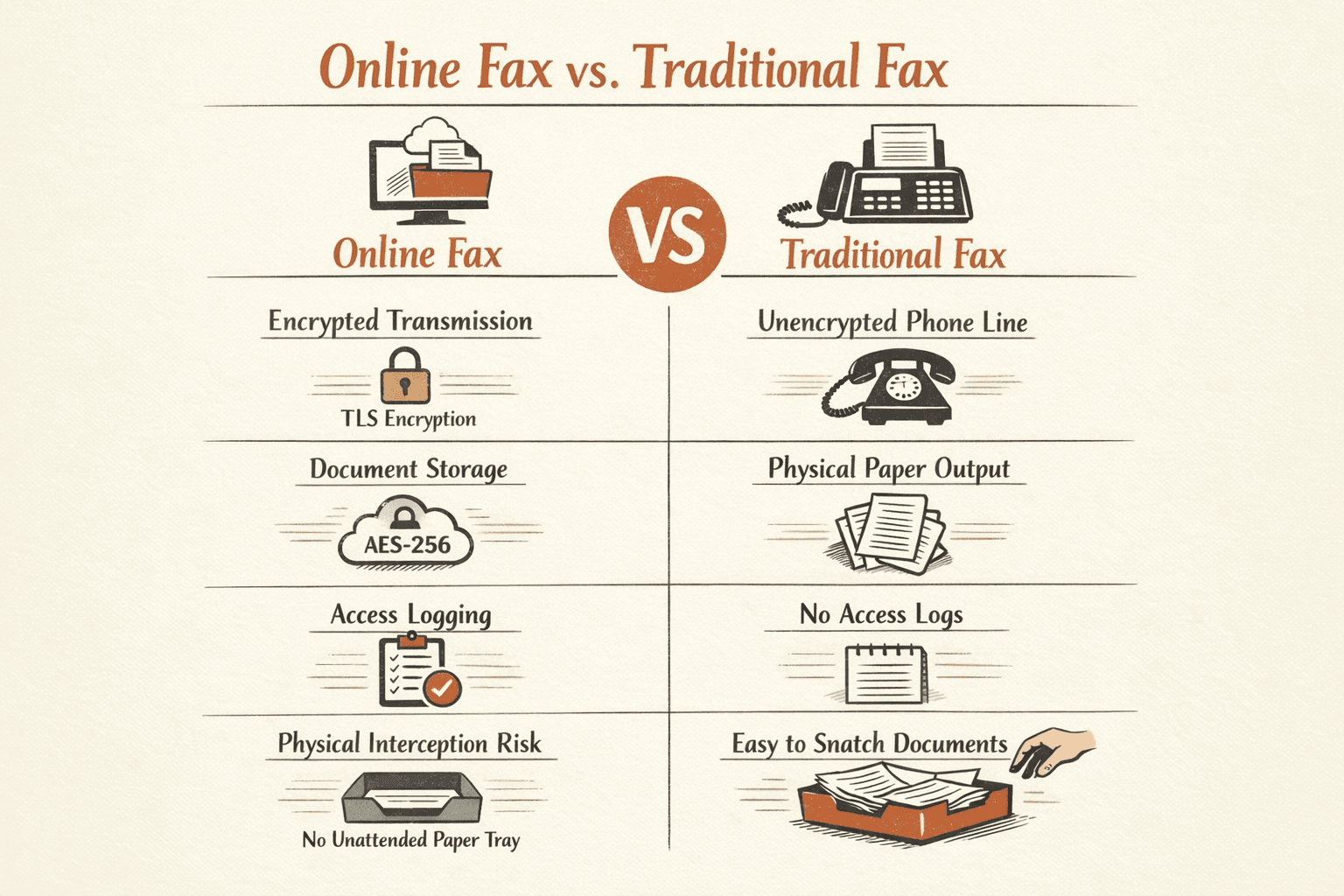
Security advantages online fax services offer over physical fax machines:
- Encrypted transmission — Online services use TLS encryption, while traditional phone lines send faxes unencrypted over the wire
- Secure cloud storage — Documents stored with AES-256 encryption beat physical papers sitting in an unsecured tray
- Access logging — Enterprise services track who viewed what and when—something impossible with a physical fax machine
- No physical interception — Nobody can walk by and grab your incoming fax before you do
That said, not all online services are created equal. Consumer-focused platforms may skip expensive compliance certifications, use weaker encryption defaults, or store data in locations that don’t meet regulatory requirements.
Is Online Fax Secure?
Online fax is secure when the service uses TLS 1.2 or newer for transmission and AES-256 encryption for storage—meeting or exceeding traditional fax security.
Here’s how it works: When you send a fax online, your document is encrypted using TLS (the same technology that secures online banking) before it travels over the internet. At the receiving end, it’s converted to a standard fax signal or delivered as an encrypted file. During storage, reputable services encrypt your documents with AES-256, which is the same standard used by the U.S. government for classified information.
The main misconception is that traditional phone-line faxing is inherently more secure. It’s not. Phone lines transmit faxes in the clear—anyone with access to the line can intercept them. Online fax with proper encryption is actually stronger, as long as you’re using a service that implements these protections correctly.
Does Fax From iPhone Work?
Yes, faxing from iPhone works through dedicated fax apps that connect to online fax services. You don’t need a physical fax machine or phone line—the app handles everything digitally.
Here’s the process:
- Download a fax app (2 minutes): Install an app like eFax, Fax.Plus, or Dropbox Fax from the App Store. Most offer free trials.
- Upload or scan your document (1 minute): Use your iPhone’s camera to scan a paper document, or upload a PDF/image from Files, iCloud, or another cloud service.
- Enter the recipient’s fax number (30 seconds): Type in the destination number (including area code). International faxing is supported by most services.
- Add a cover page if needed (1 minute): Most apps let you add a quick cover page with your name and message.
- Send (instant): Tap send and the app transmits your fax through its online service. You’ll get a delivery confirmation within minutes.
Reliability depends on two factors: the app’s backend service quality and your internet connection. Mainstream services like eFax and Fax.Plus have strong delivery rates because they operate proper infrastructure, while lesser-known apps may have spotty transmission success.

How to Choose a Safe Fax App
Start by evaluating the app’s security, compliance, and company transparency. Don’t trust marketing claims—verify them through independent sources and user reviews.
Evaluation criteria to check before committing:
- Compliance certifications — Look for SOC 2 reports, HIPAA support (if you need it), or ISO certifications. Verify these claims on the company’s website, not just the app listing.
- Encryption standards — Confirm the service uses TLS 1.2+ for transmission and AES-256 for storage. These should be stated clearly in the security documentation.
- Pricing transparency — All costs should be shown upfront: per-page rates, subscription fees, overage charges, and cancellation terms. Hidden fees are a red flag.
- Review patterns — Check multiple sources for consistent feedback. Be skeptical of review bursts or generic praise—look for specific complaints or praise.
- Customer support availability — Test it before you pay. Send an email or try the chat. If you can’t reach them during sign-up, you won’t reach them when something breaks.
- Free trial or money-back guarantee — This lets you test transmission quality, app reliability, and interface usability before committing.
- Privacy policy clarity — Read how long they keep your documents, whether they share data with third parties, and what happens when you cancel.
- Permission requests — The app should only request camera (for scanning) and file access (for uploads). Microphone, contacts, or location access without a clear reason is suspicious.
If you’re sending medical records or other regulated documents, verify the service offers proper HIPAA safeguards and will sign a business associate agreement at your subscription level—not just at enterprise pricing.

Recommended Secure Fax Apps (Reviews)
These apps have been evaluated for security features, compliance certifications, transparent pricing, and real company backing. They’re not perfect, but they meet basic safety and legitimacy standards.
Fax.Plus
Fax.Plus offers strong security and a polished interface, with HIPAA compliance available when you activate advanced security controls on the Enterprise tier and sign a business associate agreement. Pricing starts at $8.99/month for 200 pages, with a 10-page free tier and integrations with Google Drive, Dropbox, Microsoft 365, Slack, and Zapier.
Pros:
- Clean, modern interface that’s easy to use
- Transparent pricing with clear overage rates ($0.10 to $0.03/page depending on tier)
- Good mobile app experience (4.6 stars, 30K+ reviews)
- HIPAA available for regulated users
Cons:
- HIPAA locked behind expensive Enterprise tier ($99.99/month)
- API access and advanced governance require enterprise pricing
- Free tier is very limited (10 pages total lifetime)
eFax
eFax is one of the most established names in online faxing, with TLS and AES-256 encryption and HIPAA support on the Protect ($49.99/month) and Corporate tiers. Pricing starts at $18.99/month for 170 pages, with email, web, and mobile access, plus features like searchable faxes and e-signing.
Pros:
- Long-established provider (operated by Consensus Cloud Solutions)
- HIPAA compliance available (though expensive)
- Wide range of features including e-signing and searchable faxes
- 14-day free trial
Cons:
- Users report lost transmissions and confusing delivery confirmations
- Buggy portal and mobile app (4.1 stars with frequent complaints)
- HIPAA only available on expensive Protect tier
- Billing and cancellation complaints common in reviews
Dropbox Fax
Dropbox Fax (formerly HelloFax) offers tight integration with cloud storage services like Google Drive, Dropbox, Box, and OneDrive, with TLS and AES-256 encryption and SOC 2 and SOC 3 coverage. However, HIPAA support is not available for Dropbox Fax specifically. Pricing includes a free 5-page tier, pay-per-fax at $0.99/fax (up to 10 pages), and subscriptions starting at $9.99/month.
Pros:
- Excellent cloud integration for users already in the Dropbox ecosystem
- Clean pay-per-fax option for occasional users
- Strong audit coverage (SOC 2, SOC 3, ISO 27001/27018)
- Generous 30-day free trial
Cons:
- No HIPAA support—not suitable for healthcare use
- Annual pricing not clearly surfaced on website
- Compliance positioning is weaker than competitors focused on regulated industries
iFax
iFax positions itself as a HIPAA-compliant option on paid tiers, with integrations for Google Drive, Dropbox, and Box, and a no-overage-fee pricing model. Pricing starts at $12.49/month for 200 pages, with a 10-fax free tier and cross-platform support (Mac, Windows, iOS, Android).
Pros:
- HIPAA compliance on paid tiers
- No overage fees (pages roll over month-to-month on some plans)
- Cross-platform availability
- 7-day Professional trial
Cons:
- Lower user rating (3.4 stars, 6.4K reviews)
- Free trial confusion and unexpected payment prompts frequently reported
- Pricing inconsistent across different platforms
- Fewer reviews than major competitors

Conclusion
Fax apps are safe and legitimate when you choose reputable services that use proper encryption, hold relevant compliance certifications, and operate transparently. But not every app in the store meets these standards—some cut corners on security, hide behind vague policies, or make false compliance claims.
Before committing to any fax service, verify its encryption standards (TLS 1.2+ and AES-256), check for third-party audits like SOC 2 or ISO certifications, and confirm the company is transparent about pricing, data handling, and ownership. For regulated industries, make sure HIPAA support is available at your subscription level and that the provider will sign a business associate agreement.
Check pre-download disclosures on the App Store or Google Play, scan reviews for consistent complaints, and test customer support before you pay. If you need to send just one fax without the subscription commitment, ThirtyFax offers a straightforward pay-once option—no account required, transparent pricing, no ongoing billing.
Frequently Asked Questions
Are Fax Apps Secure?
Security depends on the specific app’s encryption and compliance standards. Reputable apps use TLS 1.2+ for transmission and AES-256 for storage, meeting modern security requirements. Lesser-known apps may skip these protections, leaving your documents exposed.
Is Online Fax Secure?
Online fax is secure when proper encryption is used. Services that encrypt transmission with TLS 1.2+ and storage with AES-256 meet or exceed traditional fax security. However, this depends on the specific service—not all online fax providers implement these protections.
Is the Fax App Safe?
To determine if a specific fax app is safe, check user reviews for complaints about lost faxes or billing issues, verify the company has transparent contact information and a clear privacy policy, and confirm the app only requests necessary permissions (camera for scanning, file access for uploads).

Written by
Bernard Bado
I created ThirtyFax after needing to send a single fax and refusing to pay for a monthly subscription to do it. I write here about faxing, document workflows, and the surprisingly stubborn role fax still plays in modern business.
View author profile