
What Is a Fax? (Definition + Modern Context)
A fax transmits document images electronically—originally over phone lines, now via internet. Still used in healthcare, legal, and government sectors where compliance makes it hard to replace.
Quick Verdict
A fax is a method of transmitting document images electronically—originally over phone lines, now increasingly over the internet. The sending device converts a physical or digital document into data, transmits it to another fax-capable device, and the recipient gets an identical copy. Despite being decades-old technology, fax is still used daily in healthcare, legal, and government sectors where compliance, documentation, and established workflows make it hard to replace.
What Is a Fax?
Faxing works by converting a document into transmittable data—either audio signals over phone lines or digital packets over the internet. The receiving device decodes that data and outputs a copy of the original document, either printed on paper or stored as a digital file. ITU-T Recommendation T.30 defines the international standard for how fax machines communicate, making it possible for any two fax-capable devices to exchange documents regardless of manufacturer.
Here’s what defines fax technology:
- Document replication — The goal is a faithful copy of the original, not a new file format
- Point-to-point transmission — Sent from one device directly to another, using a phone number or fax address
- Standardized protocols — Devices negotiate transmission speed and format automatically during the connection handshake
- Output as image data — The received document is a scan-quality image, not editable text
Fax became widespread in the 1980s when businesses needed a faster alternative to mailing documents. Before email and cloud storage, fax was revolutionary—you could send a signed contract across the country in minutes instead of days. That speed and the legal acceptance of faxed signatures made it a business standard that never fully went away.

What Does a Fax Look Like?
A received fax is typically printed on standard letter (8.5" × 11") or A4 paper in black and white or grayscale. Traditional fax machines print as the document is received, so you get a physical page immediately—no digital step required.
Here’s what you’ll see on a typical fax:
- Resolution around 200 dpi — Fine detail is softer than the original; Canon’s specifications show most faxes use 200 × 100 dpi (Normal), 200 × 200 dpi (Fine), or 200 × 400 dpi (Superfine)
- Header information at the top — Date, time, sender’s name or number, page count (required by FCC rules)
- Possible transmission artifacts — Horizontal lines, distortion, or smudging from poor phone connections
- Paper curl on thermal printers — Older fax machines use thermal paper that curls and fades over time
- Timestamp formatting — Often shows military time or a format like “05/23/2026 14:32”
Modern online fax services deliver faxes as PDF or TIFF files via email or app. You see the same content—scanned document images with headers—but no physical paper, no curl, and often higher visual quality since there’s no analog conversion step.
What Is a Fax Header?
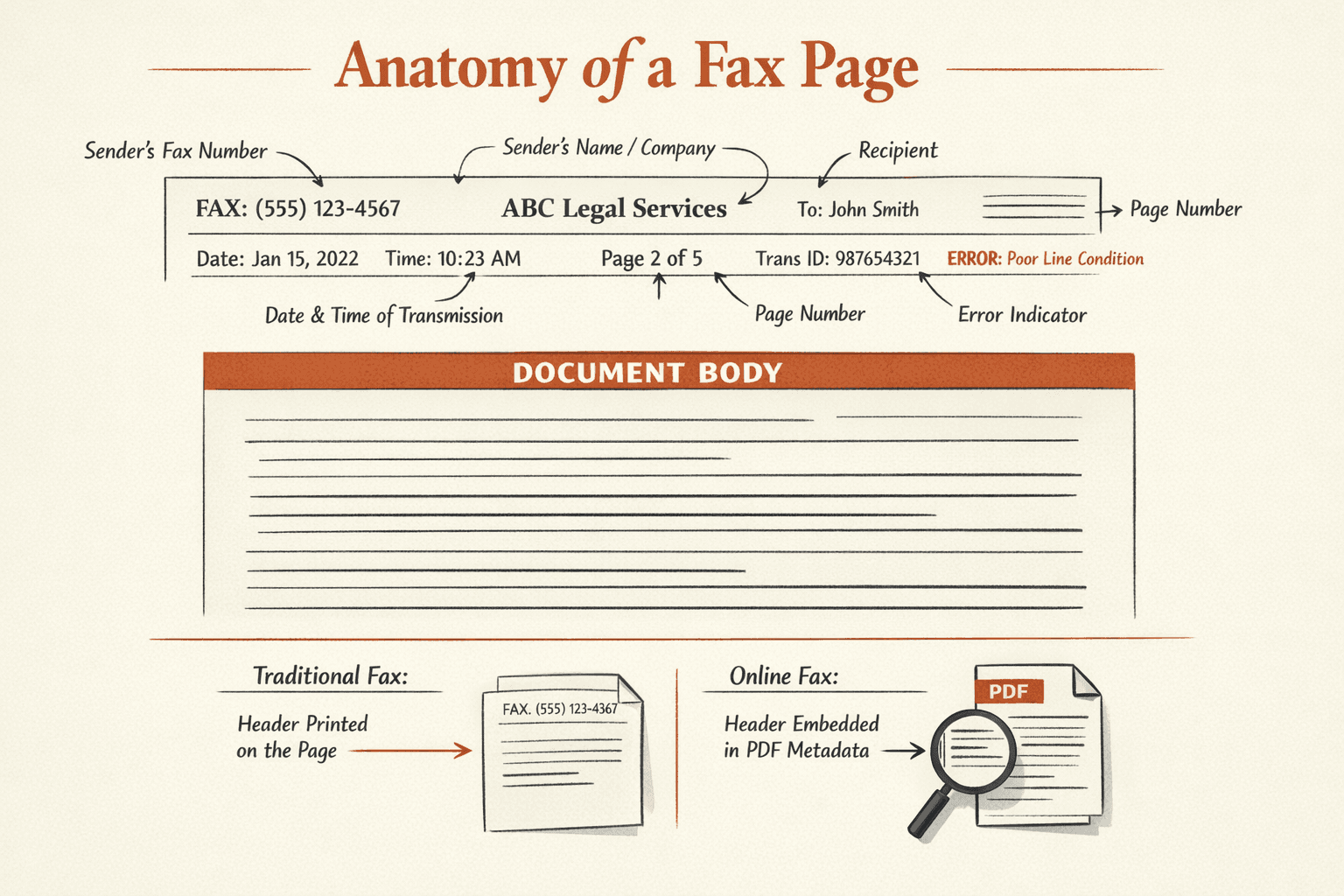
The fax header is the line of information automatically printed (or embedded) at the top of each fax page. It identifies who sent the fax, when, and from what number.
A typical fax header includes:
- Sender’s fax number — The phone number or fax address the document came from
- Sender’s name or company — User-configured label, like “ABC Legal Services”
- Recipient information — Sometimes includes the destination number or recipient name
- Date and time of transmission — Exact timestamp, usually in the sender’s time zone
- Page number — Shows which page this is out of the total (e.g., “Page 2 of 5”)
- Transmission ID — Unique identifier for tracking and troubleshooting
- Error indicators — Some headers show transmission quality or retransmission flags
Fax headers exist for legal documentation and tracking. The FCC requires that every fax include the date, time, sender identification, and phone number—making it possible to verify when a document was sent and by whom.
Online fax services handle headers differently than traditional machines. Instead of printing them on the document, they’re often embedded in the PDF metadata or displayed separately in the web interface—cleaner for digital storage, but same legal function.
What Is a Fax Modem?
A fax modem is a hardware device that lets computers send and receive faxes through phone lines. Think of it as a translator—it converts digital computer files into analog audio signals that can travel over traditional phone networks, and vice versa.
Here’s how fax modems work: when you send a fax from your computer, the modem encodes your document as audio tones compatible with the public phone system. The receiving fax machine (or another modem) decodes those tones back into image data. It’s the same principle as dial-up internet modems, but optimized for document transmission instead of web browsing.
Key characteristics of fax modems:
- Connection types — Internal (installed inside the computer) or external (connected via USB or serial port)
- Speed ratings — Typically 14.4 kbps (V.17) or 33.6 kbps (V.34)—slow by modern standards, but standard for fax
- Compatibility — Must support ITU T.30 protocol to communicate with other fax devices
- Common era — Peaked in the 1990s-2000s when businesses used desktop computers with phone-line faxing
Fax modems are largely obsolete now—replaced by internet fax services that send documents over IP networks instead of phone lines. You’ll still find them in some legacy enterprise systems, but most people who need to fax from a computer use an online service instead.
What Is a Fax Server?
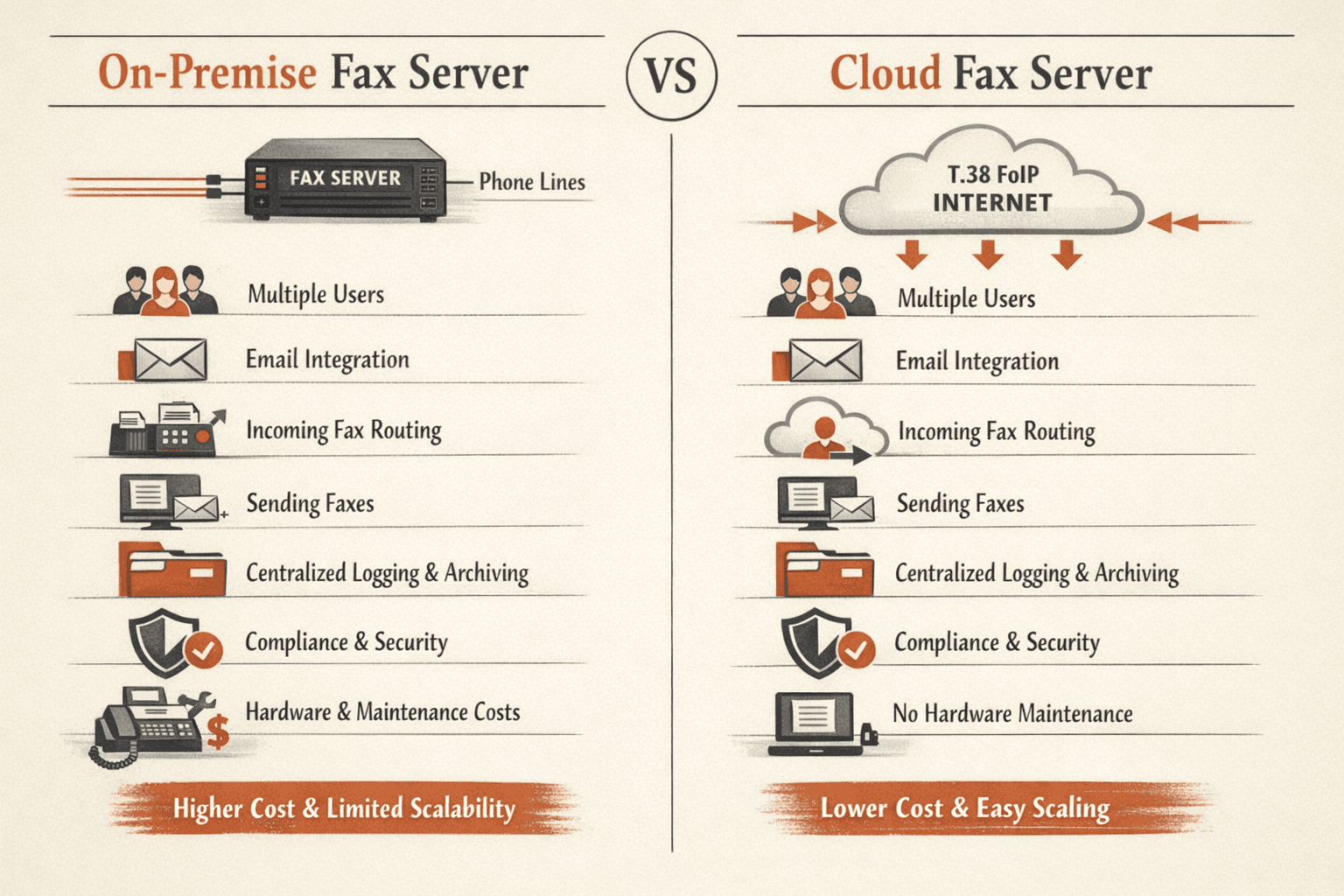
A fax server is a centralized system that manages fax transmission and reception for multiple users or an entire organization. Instead of each person having their own fax machine or modem, everyone routes faxes through a shared server.
Fax servers handle everything: incoming faxes are routed to the correct recipient (usually by email), outgoing faxes can be sent from any computer on the network, and all fax activity is logged and archived. It’s the enterprise-scale version of faxing—consolidates hardware, simplifies management, and integrates fax with other business tools.
What fax servers do:
- Eliminate individual fax machines — One server replaces dozens of standalone devices
- Integrate with email systems — Users send faxes from their email client, receive faxes as email attachments
- Provide centralized management — IT can control access, monitor usage, and enforce policies
- Enable digital storage — All faxes archived automatically, searchable, backed up
- Reduce costs — Fewer phone lines, less hardware, lower maintenance
- Support compliance workflows — Audit trails, encryption, access controls for regulated industries
There are two types of fax servers: on-premise hardware (physical server and phone-line connections in your office) and cloud-based solutions (managed service accessed over the internet, using FoIP protocols like T.38). Cloud fax servers are the modern default—cheaper, easier to scale, and no hardware to maintain.
Why Fax Is Still Used Today
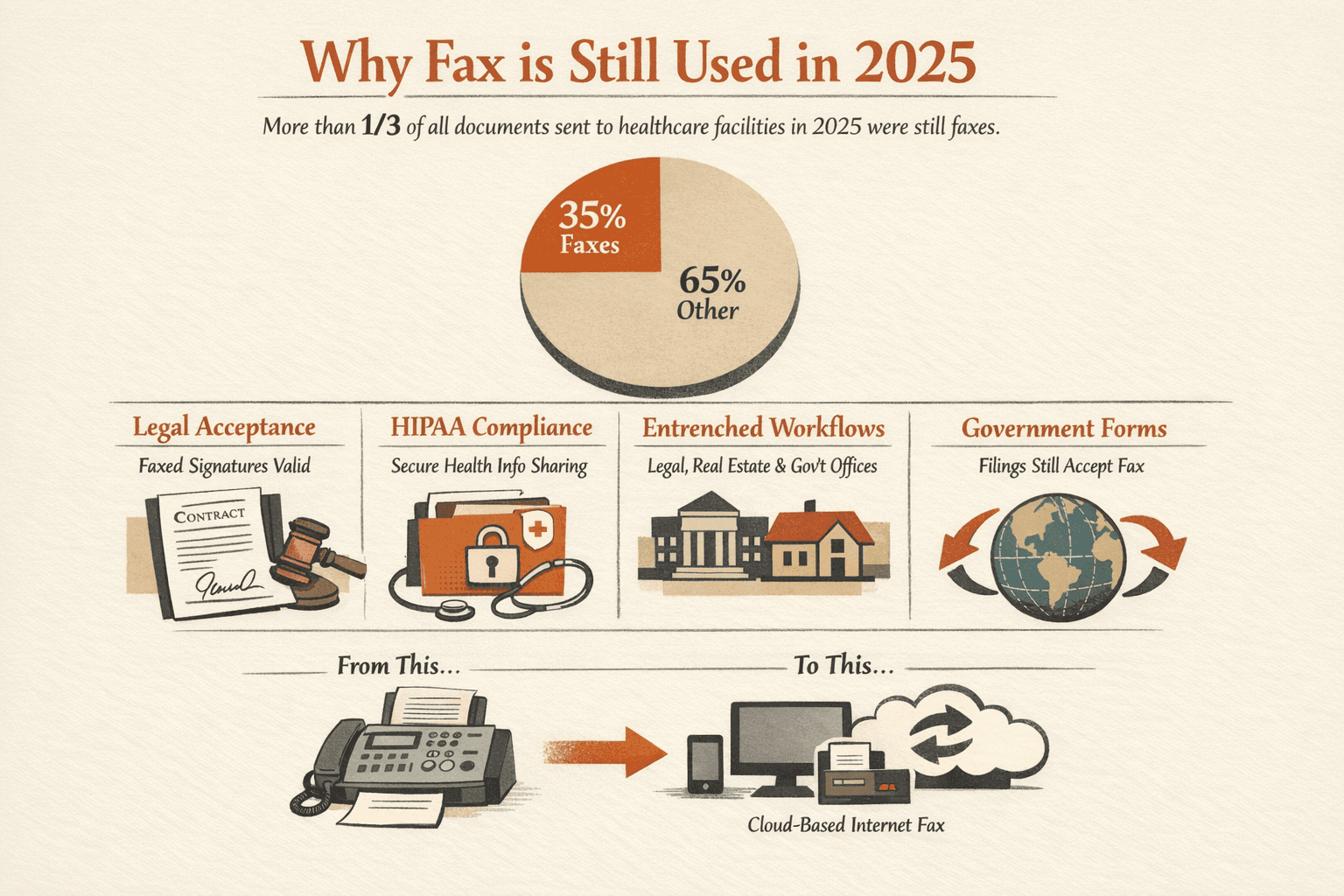
Fax feels ancient, but more than one-third of all documents sent to healthcare facilities in 2025 were still faxes. It’s not because people love old technology—it’s because certain industries are locked into workflows and regulations that make fax hard to replace.
Here’s why fax persists:
- Legal acceptance — Faxed signatures are recognized in many jurisdictions where email signatures aren’t
- HIPAA compliance for healthcare — HHS explicitly permits fax for sharing protected health information
- Established workflows — Legal firms, real estate offices, and government agencies have decades-old fax-based processes that are expensive to rewrite
- Regulatory requirements — Some government forms and filings still require fax submission (IRS allows faxed authorizations)
- International business — Fax is a lowest-common-denominator standard that works across countries with different digital infrastructure
The good news: modern fax has evolved. Most organizations have moved from physical fax machines to cloud-based internet fax services—keeping fax functionality while eliminating phone lines, paper, and hardware maintenance.
Traditional Fax vs Modern Online Fax
| Factor | Traditional Fax Machine | Online Fax Service |
|---|---|---|
| Equipment needed | Dedicated fax machine, phone line | Computer or smartphone, internet connection |
| Transmission method | Analog audio signals over PSTN phone lines | Digital data over IP networks (FoIP) |
| Cost structure | Hardware ($100-300), phone line ($20-40/month), paper, toner | Subscription ($10-50/month) or pay-per-fax ($0.99-5/fax) |
| Document storage | Physical paper only, unless you scan manually | PDF/TIFF files stored digitally, searchable, backed up |
| Ease of use | Walk to machine, load paper, dial, wait | Send from email or app, no physical steps |
| Environmental impact | Paper waste, toner cartridges, e-waste | Paperless by default |
| Accessibility | Office-only, single location | Access from anywhere with internet |
| Integration | None—standalone device | Integrates with email, cloud storage, mobile apps |
Online fax services keep the fax functionality—point-to-point document transmission using phone numbers—but eliminate the physical infrastructure. You send and receive faxes like emails, with all the benefits of cloud storage and mobile access.
Common Uses for Fax in 2026
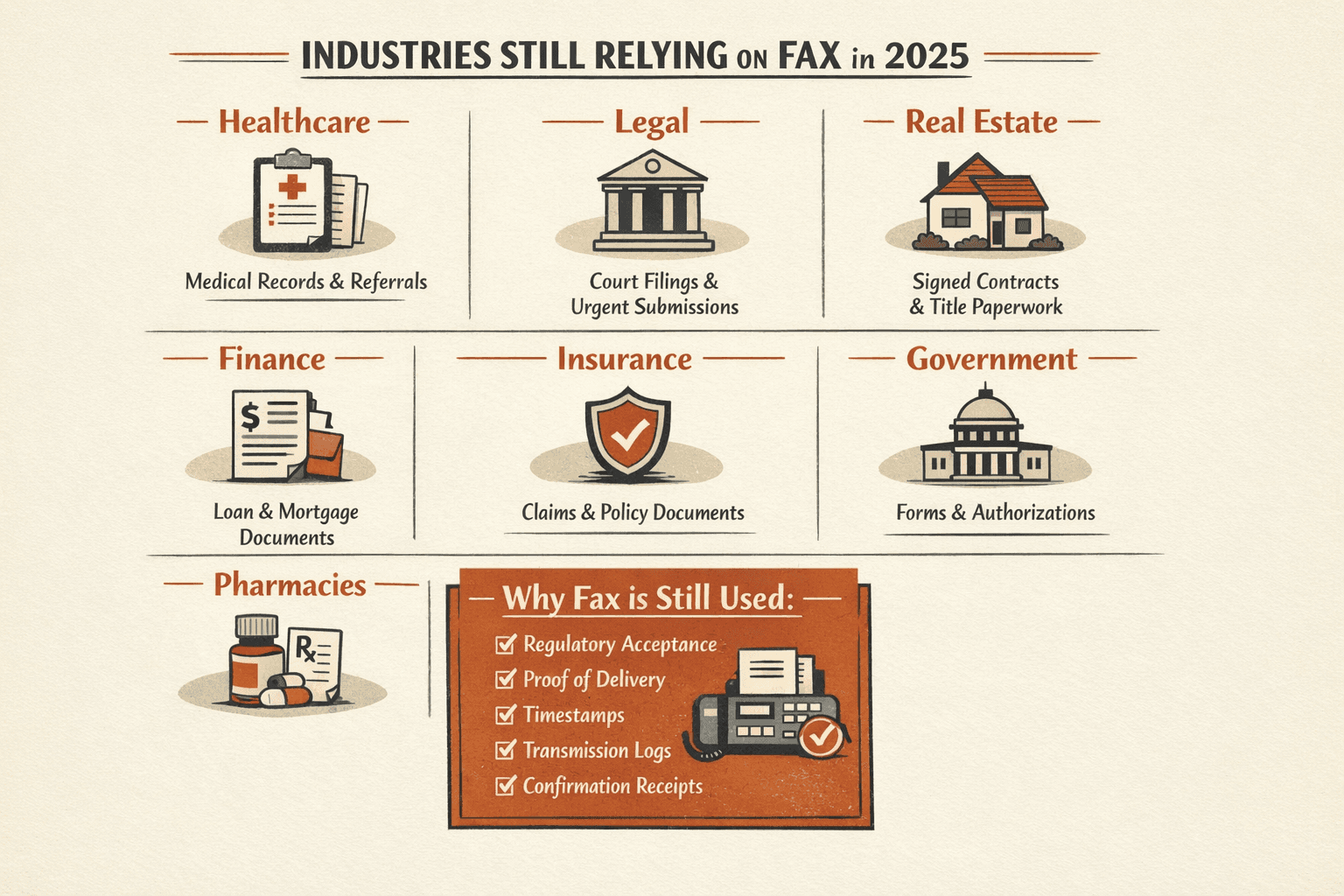
Fax isn’t universal anymore—it’s concentrated in specific industries where compliance and established workflows make it the default option. You won’t find fax at startups or tech companies, but you will find it at hospitals, law firms, and government agencies.
Here’s where fax is still common:
- Medical records transmission — Healthcare providers fax patient information for referrals, lab results, and care coordination under HIPAA
- Legal document filing — Courts accept faxed filings; law firms use fax for time-sensitive submissions
- Real estate contracts — Signed purchase agreements, lease documents, and title paperwork often faxed for speed
- Financial applications — Loan documents, mortgage approvals, account authorization forms
- Insurance claims — Medical claims, accident reports, policy documents sent by fax
- Government forms — IRS accepts faxed tax authorizations, some state agencies require fax submissions
- Prescription orders — Pharmacies receive prescriptions by fax from doctors’ offices
- Signed agreements requiring verification — Any situation where a signature needs quick delivery and proof of transmission
The common thread: regulatory acceptance and proof-of-delivery. Fax provides a timestamp, transmission log, and confirmation receipt—making it legally defensible in ways that email attachments sometimes aren’t.
If you need to send a single fax—a signed contract, a medical form, anything time-sensitive—ThirtyFax is the fastest option. No account, no subscription, just pay once and send. Free for up to 5 pages, €4.99 flat for up to 20 pages. Done in 2 minutes.

Written by
Bernard Bado
I created ThirtyFax after needing to send a single fax and refusing to pay for a monthly subscription to do it. I write here about faxing, document workflows, and the surprisingly stubborn role fax still plays in modern business.
View author profile