
How to Send a Fax From Your Cell Phone
You don't need a smartphone to send a fax. Use a web-based service through your mobile browser or connect your phone to a fax adapter. Both methods work on basic cell phones.
Quick Verdict
Yes, you can send a fax from a basic cell phone using a web-based fax service accessed through your mobile browser or by connecting your phone to a fax adapter. Both methods work without smartphone apps or advanced features—just a mobile browser or a physical adapter.
How to Fax From Your Cell Phone
You have two options: use a web-based fax service through your phone’s mobile browser, or connect your cell phone to a fax adapter that bridges your phone to a fax machine. The browser method is simpler if your phone can upload files; the adapter method works when you need to send physical documents.

Using a Web-Based Fax Service
- Open your mobile browser (2 minutes): Launch the web browser on your cell phone and navigate to a fax service website. ThirtyFax works without creating an account—enter your details and upload your document directly.
- Enter the recipient fax number: Type the full fax number including area code. For international faxes, add the country code (e.g., +1 for US numbers).
- Upload your document: If your phone supports file uploads through the browser, select your document file. Some older phones may require you to send the document via email to the fax service instead.
- Send the fax: Click “Send” and wait for the transmission to process. Most services show a progress indicator.
- Check confirmation: You’ll receive a confirmation page or email stating whether the fax was delivered successfully. Keep this for your records.

Reality check: Older feature phones without file upload capability may struggle with browser-based services. If you can’t upload a file, email-to-fax is your alternative—compose an email with the document attached and send it to the service’s email-to-fax address.
Using a Fax Adapter with Your Cell Phone
Fax adapters (also called Analog Telephone Adapters) let you connect a traditional fax machine to your cell phone’s voice connection. The adapter converts the fax signal so it can transmit over your cellular network.
- Connect the adapter to your cell phone (5 minutes): Plug the fax adapter into your cell phone’s headphone jack or use a Bluetooth-enabled adapter if your phone supports it. Follow the adapter manufacturer’s setup instructions.
- Connect your fax machine: Plug your fax machine’s phone line into the adapter’s output port. The adapter acts as a bridge between the cellular connection and the fax machine.
- Load your document: Place your document in the fax machine’s scanner or document feeder, just like you would for a traditional landline fax.
- Dial the fax number: Use your cell phone to dial the recipient’s fax number, then press send on the fax machine to initiate transmission.
- Wait for confirmation: The fax machine will print a transmission report showing whether the fax was delivered. If it fails, the report will show an error code.
Important caveat: Fax transmission over cellular networks isn’t always reliable. Cisco’s ATA documentation confirms that analog fax adapters work, but quality depends on your cellular signal strength and carrier support. Test before sending critical documents.

How to Fax a Document to a Phone Number
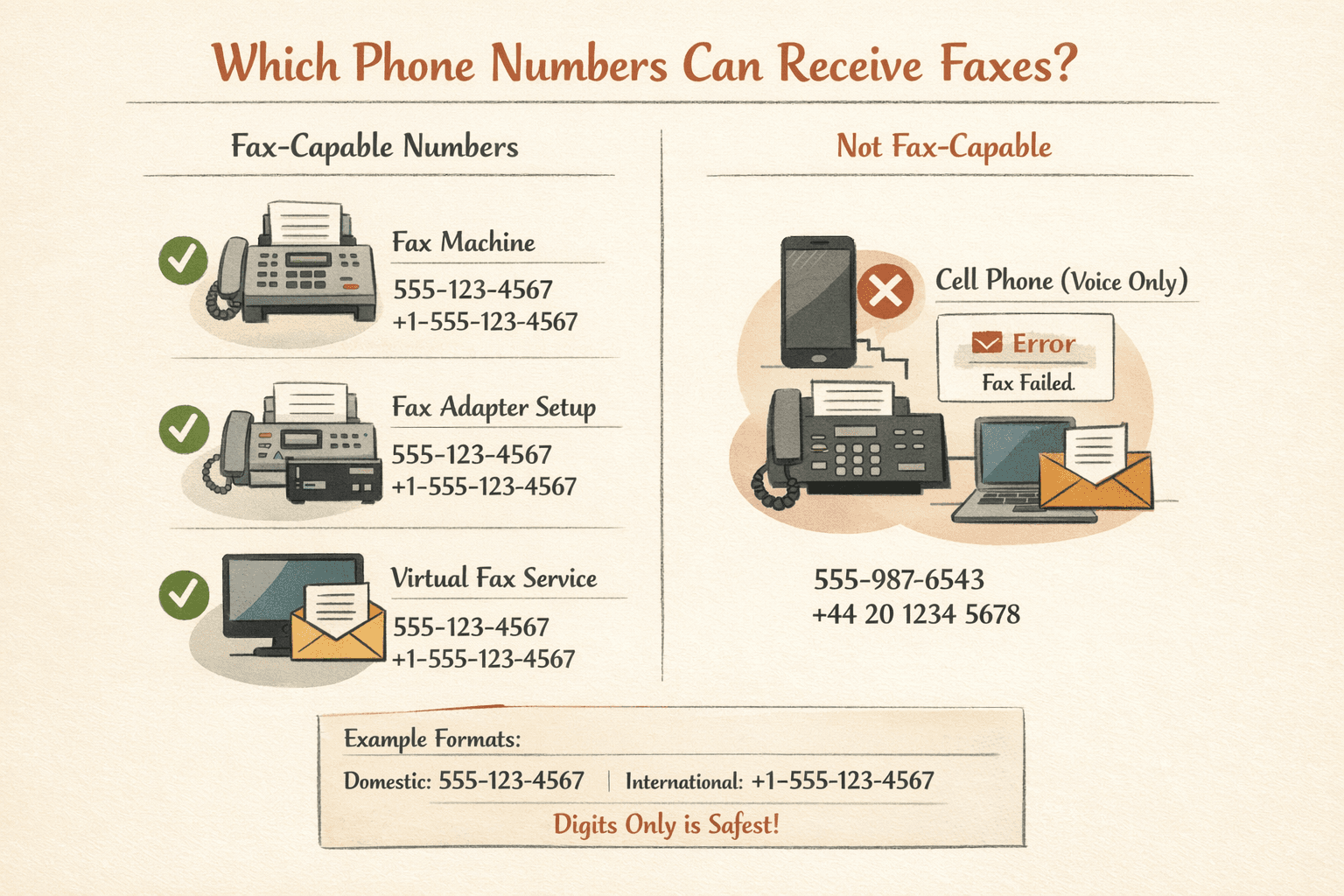
You fax to a phone number by entering it as the destination in your fax service or adapter, exactly like dialing a call. The number routes to either a fax machine or a fax-enabled service.
Format requirements:
- Include area code: Always use the full 10-digit number format for domestic faxes (e.g., 555-123-4567)
- Add country code for international: Use ITU international dialing format with + plus country code (e.g., +44 20 1234 5678 for UK)
- No special characters: Most services accept dashes and spaces, but entering just digits is safest
Here’s the critical distinction: not every phone number can receive faxes. A standard voice-only cell phone number will reject fax transmissions because it lacks the equipment or service to decode the fax signal. The recipient needs either a physical fax machine, a fax adapter, or a virtual fax service that converts incoming faxes to email or digital files.
If you’re faxing to what looks like a regular phone number, verify it’s actually fax-capable before sending. Otherwise, your transmission will fail and you’ll waste time troubleshooting.
FAQ
Can You Send a Fax From a Cell Phone?
Yes, cell phones can send faxes using either a browser-based fax service that works on any phone with web access, or a physical fax adapter that connects your phone to a fax machine.
Can You Fax From a Phone?
Yes, both landline phones and cell phones can send faxes with the right equipment or service. Landlines connect directly to fax machines; cell phones need adapters or web-based services.
Can You Use a Fax Machine With a Cell Phone?
Yes, fax adapters allow you to connect a traditional fax machine to a cell phone. XENNECT’s installation guide confirms that Analog Telephone Adapters (ATAs) bridge fax machines to cellular networks, though reliability depends on signal quality and carrier compatibility.
Can You Connect a Fax Machine to a Cell Phone?
Yes, using a fax adapter (ATA device) that plugs into your cell phone and provides a standard phone jack for the fax machine. Setup takes about 5 minutes but success rates vary by carrier.
Can You Fax to a Cell Phone?
You can fax to a cell phone number only if the recipient has configured it to receive faxes through a fax-to-email service or virtual fax number. Standard voice-only cell numbers will reject fax transmissions.
Can You Send a Fax to a Cell Phone?
Sending a fax to a cell phone number requires the recipient to have fax reception capability enabled—either through a virtual fax service, a fax adapter, or a carrier feature that converts faxes to voicemail or email.
Can You Fax to a Cell Phone Number?
Cell phone numbers can receive faxes only when connected to fax-to-email services, virtual fax providers, or specialized adapters. A regular voice-only number cannot decode fax signals.
Is a Fax Number a Phone Number?
Yes, a fax number is a type of phone number. The difference is routing: fax numbers connect to equipment or services that decode fax transmissions, while voice numbers route to phones for spoken conversations. Both use the same ITU-T telephone numbering format.
Key differences:
- Routing: Fax numbers route to fax machines or fax services; voice numbers route to phones
- Signal compatibility: Fax numbers decode digital fax protocol; voice numbers expect audio
- Service requirements: Fax numbers need fax-capable equipment or software on the receiving end
Can a Fax Number Be the Same as a Phone Number?
Yes, a single phone number can handle both voice calls and fax transmissions if connected to equipment or services that distinguish between call types. HP’s fax setup documentation explains that shared lines use distinctive ring patterns—one ring type for voice, another for fax—so the equipment knows how to route incoming signals.
Can I Use My Phone as a Fax Machine?
A cell phone can function like a fax machine when paired with a web-based service or fax adapter, but it doesn’t replicate all traditional features. You won’t have a paper document feeder or built-in confirmation printing—those features exist only on physical fax machines or dedicated equipment.

Written by
Bernard Bado
I created ThirtyFax after needing to send a single fax and refusing to pay for a monthly subscription to do it. I write here about faxing, document workflows, and the surprisingly stubborn role fax still plays in modern business.
View author profile