
Fax to Email: How to Receive Faxes to Your Inbox
Receive faxes directly to your email inbox using an online fax service. Setup takes 10 minutes, and faxes arrive as PDFs within 1-3 minutes.
Quick Verdict
You can receive faxes directly to your email inbox using an online fax service—no fax machine required. Setup takes about 10 minutes:
- Choose a service
- Create an account
- Configure your email delivery settings.
Once configured, inbound faxes arrive as PDF attachments in your inbox within 1-3 minutes of transmission.
How to Set Up Fax to Email
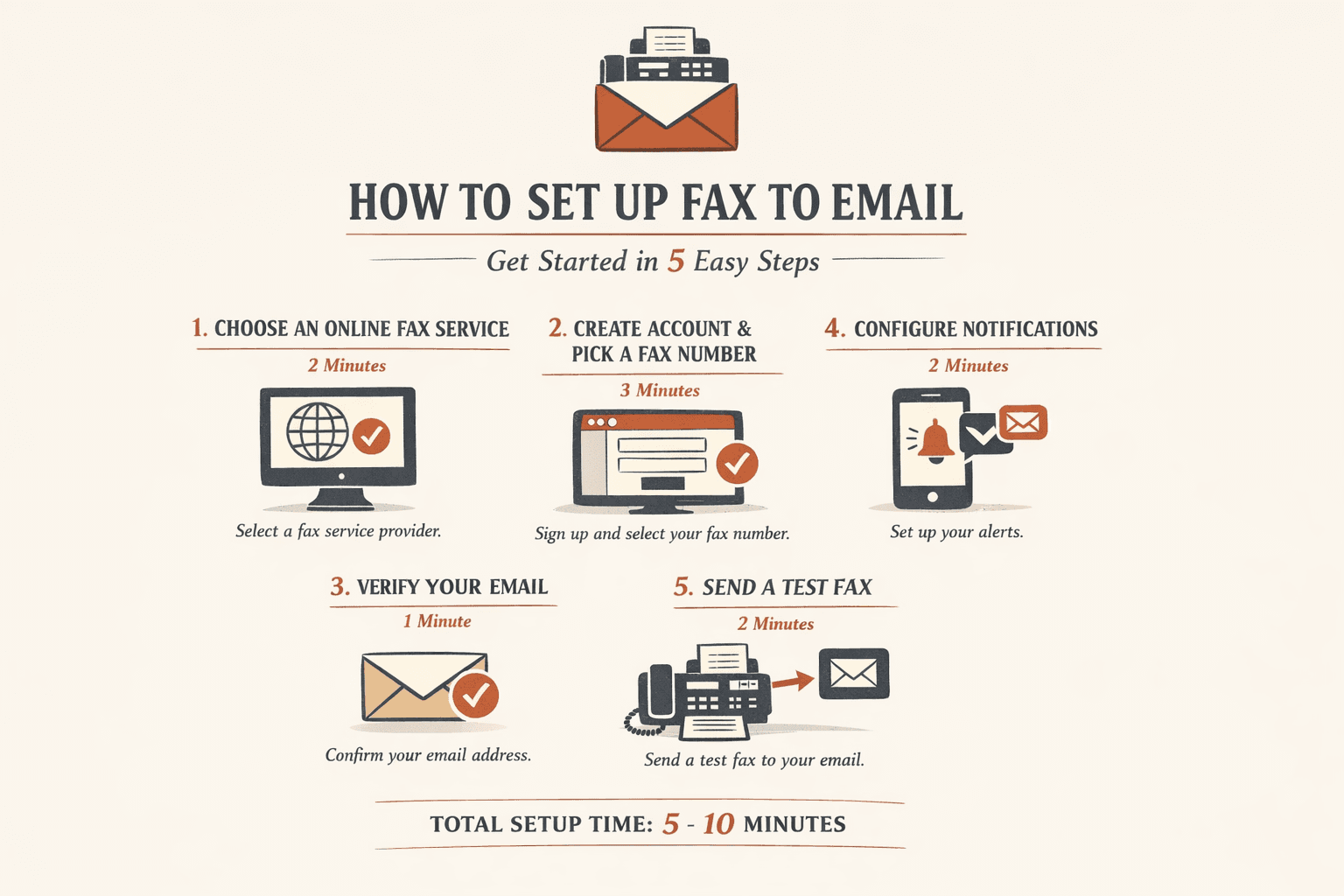
Setting up fax-to-email involves three steps: choosing a service, creating an account, and configuring email delivery settings.
- Choose an online fax service (2 minutes): Compare providers based on your needs—eFax, Fax.Plus, and Dropbox Fax are popular options. Most offer 14-day free trials so you can test delivery before committing.
- Create an account and select a fax number (3 minutes): Sign up and choose a local or toll-free number. The service assigns you a dedicated fax number that routes incoming transmissions to your email.
- Verify your email address (1 minute): Most services send a confirmation email. Click the verification link to activate email delivery—without this step, faxes won’t forward to your inbox.
- Configure email notification settings (2 minutes): Specify how you want notifications: immediate alerts, daily digests, or no notifications (just PDF attachments). You can also set up Gmail filters to automatically label or archive incoming faxes.
- Send a test fax (2 minutes): Use another fax machine or online service to send a test document to your new number. Verify the PDF arrives in your inbox and looks correct.
The entire process typically takes 5-10 minutes and requires no hardware.
How to Fax to Email Address
Faxing to an email address means sending a fax to a dedicated fax number that automatically forwards the document to an email inbox as a PDF attachment.
Here’s how the transmission works from the sender’s perspective:
- Sender prepares their document: They load paper into a fax machine or upload a file to an online fax service.
- Sender enters your fax number (not your email): They dial or enter your 10-digit fax-to-email number—it looks like any other fax number (e.g., 555-123-4567).
- Fax is transmitted: The document is sent over the phone network (if from a physical fax machine) or the internet (if from an online service).
- Service converts fax to PDF: Your fax-to-email provider receives the transmission and converts it to a PDF file. Gmail can handle files up to 50 MB, so even large multi-page documents arrive without issue.
- PDF is delivered to your inbox: The service emails the PDF attachment to your registered email address, usually within 1-3 minutes.
The sender doesn’t need your email address—only your fax number.

How to Get a Fax Sent to Your Email
You receive faxes to email by sharing your fax-to-email number with anyone who needs to send you documents.
Here’s the practical workflow:
- Provide your fax number to senders: Give them your 10-digit fax-to-email number when they ask where to send documents. For example, healthcare providers commonly fax medical records—you’d share your fax number with the records department.
- Specify whether they should include a cover sheet: Some senders still use cover sheets. If your number is clearly labeled and you don’t need extra context, tell them to skip it.
- Check your email inbox for notifications: Your service will email you when a fax arrives. Most services include the PDF as an attachment—no need to log into a separate portal.
- Download PDF attachments: Click to open or save the fax. You can forward it, print it, or archive it like any other email attachment.
Most faxes arrive within 1-3 minutes of transmission—faster than traditional fax-to-paper delivery.
How to Send Fax to Email
Sending a fax to someone else’s email address requires knowing their fax-to-email number, not their email address. You can’t send a fax directly to someone@example.com—you must send to their fax number, which their service converts to email on the receiving end.
Here’s how to send:
- Obtain the recipient’s fax number (1 minute): Ask them for their fax-to-email number. It’s a standard 10-digit number, just like a traditional fax line.
- Prepare your document (2 minutes): If you have a paper document, scan it. If it’s already digital (PDF, Word doc), you’re ready. Windows 10/11 can auto-discover scanners, so setup is usually automatic.
- Choose your sending method (1 minute): Use a fax machine, multifunction printer with fax capability, or an online fax service. Microsoft Office supports Internet Fax if you have the Windows Fax driver installed.
- Enter their fax number: Type or dial the recipient’s 10-digit fax-to-email number—not their email address.
- Transmit: Hit send. The fax is delivered to their fax-to-email service, which forwards it to their inbox automatically.
Important: You cannot send a fax directly to someone@example.com. You must send to their fax number (e.g., 555-123-4567), which their service converts to email. The recipient’s email address never appears in the fax transmission—only their fax number matters.

Recommended Fax to Email Services
The following services offer reliable fax-to-email functionality with different pricing models and feature sets:
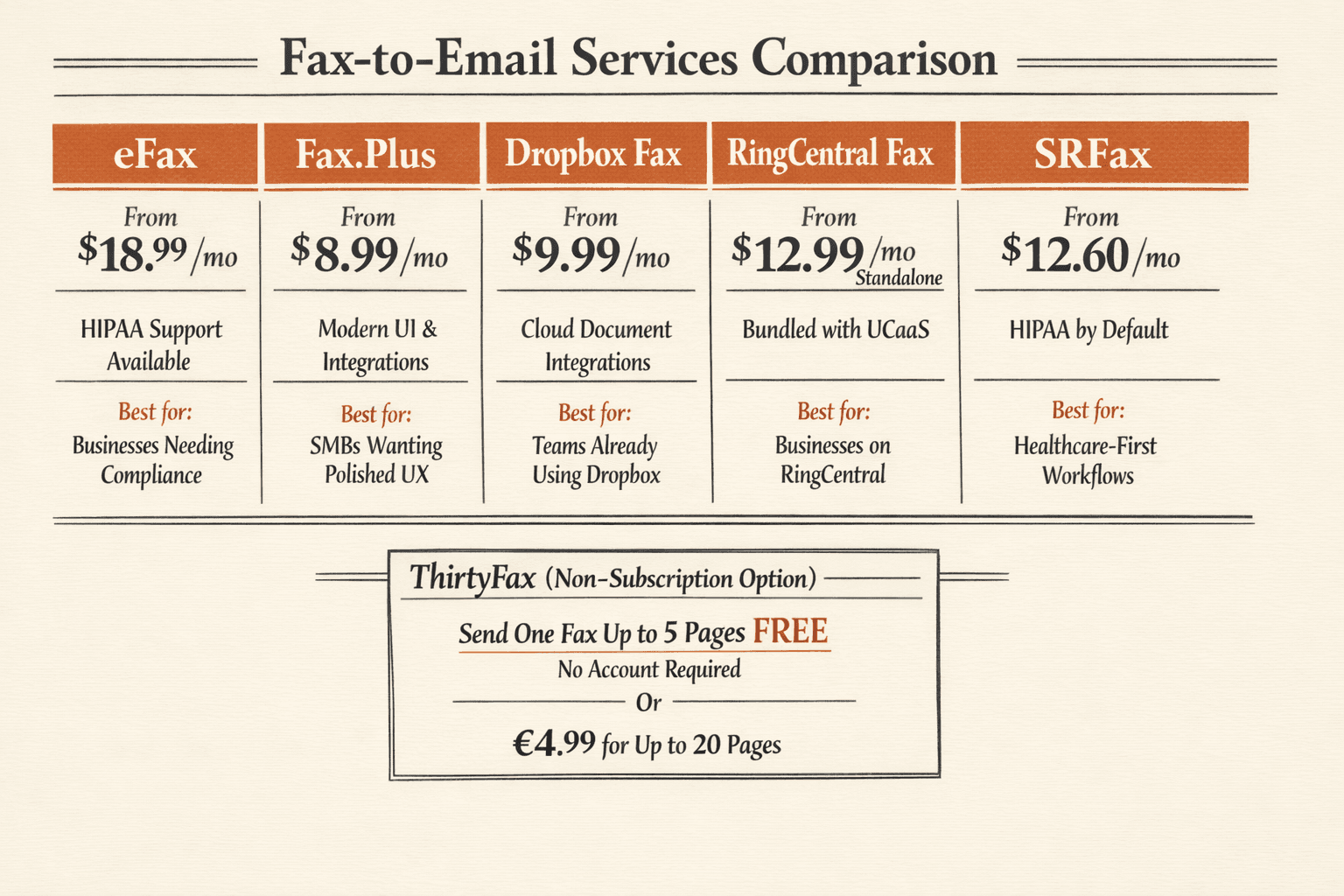
| Service | Key Feature | Starting Price | Best For |
|---|---|---|---|
| eFax | HIPAA support available | $18.99/mo | Businesses needing compliance |
| Fax.Plus | Modern UI, integrations | $8.99/mo | SMBs wanting polished UX |
| Dropbox Fax | Cloud document integrations | $9.99/mo | Teams already using Dropbox |
| RingCentral Fax | Bundled with UCaaS | $12.99/mo standalone | Businesses on RingCentral |
| SRFax | HIPAA by default | $12.60/mo | Healthcare-first workflows |
All of these services include email delivery, web and mobile access, and PDF conversion. Choose based on your compliance needs, budget, and integration requirements.
If you only need to send a single fax once in a while, you don’t need a subscription service at all. ThirtyFax lets you send one fax (up to 5 pages) for free with no account required—or €4.99 for up to 20 pages. No subscription, no hidden charges, no follow-up emails. Send your fax and move on.
Ready to receive faxes in your inbox? Sign up for a service, complete the 10-minute setup, and you’ll start receiving faxes digitally within minutes.
FAQ
Can You Fax to Email?
Yes—you can fax to email using an online fax service. The service assigns you a fax number that receives incoming faxes and forwards them to your email inbox as PDF attachments. HIPAA permits healthcare providers to share patient information via fax, which is why fax-to-email remains common in regulated industries.
Can You Get a Fax to Your Email?
Yes—once you configure a fax-to-email service, all inbound faxes are delivered directly to your email inbox as PDF attachments. You don’t need a fax machine, phone line, or physical paper to receive faxes.
Can Someone Fax to My Email?
Yes—someone can fax to your email if you have a fax-to-email number. They send the fax to your assigned fax number (not your email address), and your service forwards it to your inbox automatically. The sender only needs your fax number—they don’t need to know your email address.

Written by
Bernard Bado
I created ThirtyFax after needing to send a single fax and refusing to pay for a monthly subscription to do it. I write here about faxing, document workflows, and the surprisingly stubborn role fax still plays in modern business.
View author profile