
How to Get a Fax Number Without a Landline
You don't need a landline to get a fax number. Online fax services give you a dedicated number in 5 minutes.
Quick Verdict
You can get a fax number without a landline by signing up for an online fax service. Setup takes 3-5 minutes. These services give you a dedicated fax number that works entirely over the internet.
When someone sends a fax to your number, it arrives as an email attachment or app notification. No phone line, no fax machine, no extra equipment required.
This guide covers how to choose an online fax service, set up your fax number, and start receiving faxes immediately—whether you need a permanent business line or just want to receive a single fax.
How Can I Get a Fax Number Without a Landline
Sign up for an online fax service that provides virtual fax numbers—no landline required.
Here’s how to get started:
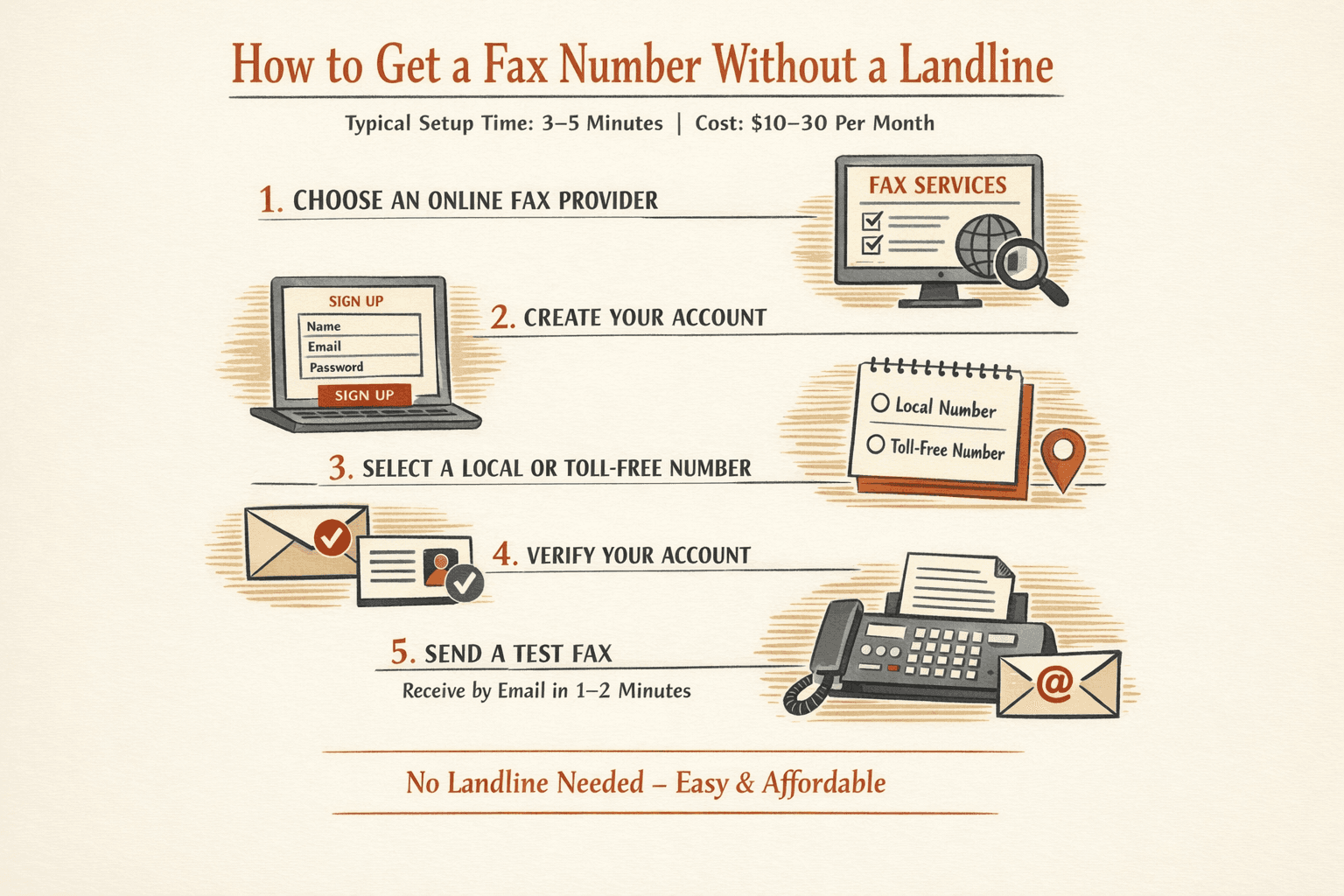
- Choose a provider (3 minutes): Popular options include eFax, Fax.Plus, and RingCentral Fax. Most offer free trials—typically 14-30 days or a small number of free pages.
- Sign up for an account (1 minute): Enter your email and create a password. Some services let you sign in with Google or Microsoft to skip account creation.
- Select your fax number (1 minute): Pick a local area code or toll-free number. Local numbers match your city; toll-free (800, 888, etc.) look more professional for customer-facing businesses.
- Verify your account: Check your email for a confirmation link. Some services require phone verification too.
- Test it immediately: Send a test fax to your new number from the provider’s web interface or app. You should receive it as an email attachment within 1-2 minutes.
Setup typically takes 5 minutes and costs $10-30 per month for unlimited plans. Most services work instantly—you can start receiving faxes the moment your account is active.
Pro tip: If you’re moving from an old landline fax number, you can port it to your new online service. Porting takes one business day for simple transfers, though some providers give you a temporary number to use immediately while the port completes.
How to Get Fax Number
You have three main options: an online fax service (fastest), a VoIP provider with fax support (good if you already use VoIP), or a traditional fax machine with a landline (rare these days).
| Method | Setup Time | Cost | Equipment Needed | Best For |
|---|---|---|---|---|
| Online fax service | 5 minutes | $10-30/month | None | Most users—works from email or app |
| VoIP provider | 15-30 minutes | $5-15/month add-on | VoIP phone adapter (ATA) for some setups | Businesses already using VoIP |
| Traditional fax machine | 30 minutes | $100-300 upfront + phone line | Fax machine, landline | High-volume offices with legacy workflows |
For most people, an online fax service is the clear winner. Setup is instant, you don’t need any hardware, and you can send and receive faxes from your phone or laptop. Online faxing requires no fax machine and works over your existing internet connection.
VoIP fax makes sense if you already pay for a VoIP phone system and want to bundle fax as an add-on feature. But be aware: faxing over VoIP requires T.38 support or careful codec configuration to work reliably. It’s more technical than online fax services.
Traditional fax machines are almost obsolete. You’d only choose this route if you fax constantly, have legacy workflows that demand physical paper handling, or work in an environment with unreliable internet.
If you just need to send or receive a fax once, you don’t need your own number at all. Services like ThirtyFax let you send a fax instantly with no account required—just upload your document and pay once (€4.99 for up to 20 pages, or free for your first 5-page fax).
How to Set Up a Fax Number
The setup process varies by method, but online fax services are fastest—most take under 10 minutes from signup to your first received fax.
Online Fax Service Setup
Here’s the complete setup process:
- Create an account (2 minutes): Visit your chosen provider’s website and sign up with an email address. Most services let you use Google or Microsoft login to skip password creation.
- Choose a plan (1 minute): Pick based on your expected volume. Light users can start with free trials or low-tier plans (100-200 pages/month); regular users should grab unlimited plans ($20-30/month) to avoid overage fees.
- Select your fax number (1 minute): Choose a local area code that matches your business location, or pick a toll-free number (800, 888, 877) if you want a more professional appearance. Some services charge extra for toll-free numbers.
- Set up payment (2 minutes): Enter your credit card. Most trials convert to paid plans automatically, so set a calendar reminder if you’re just testing.
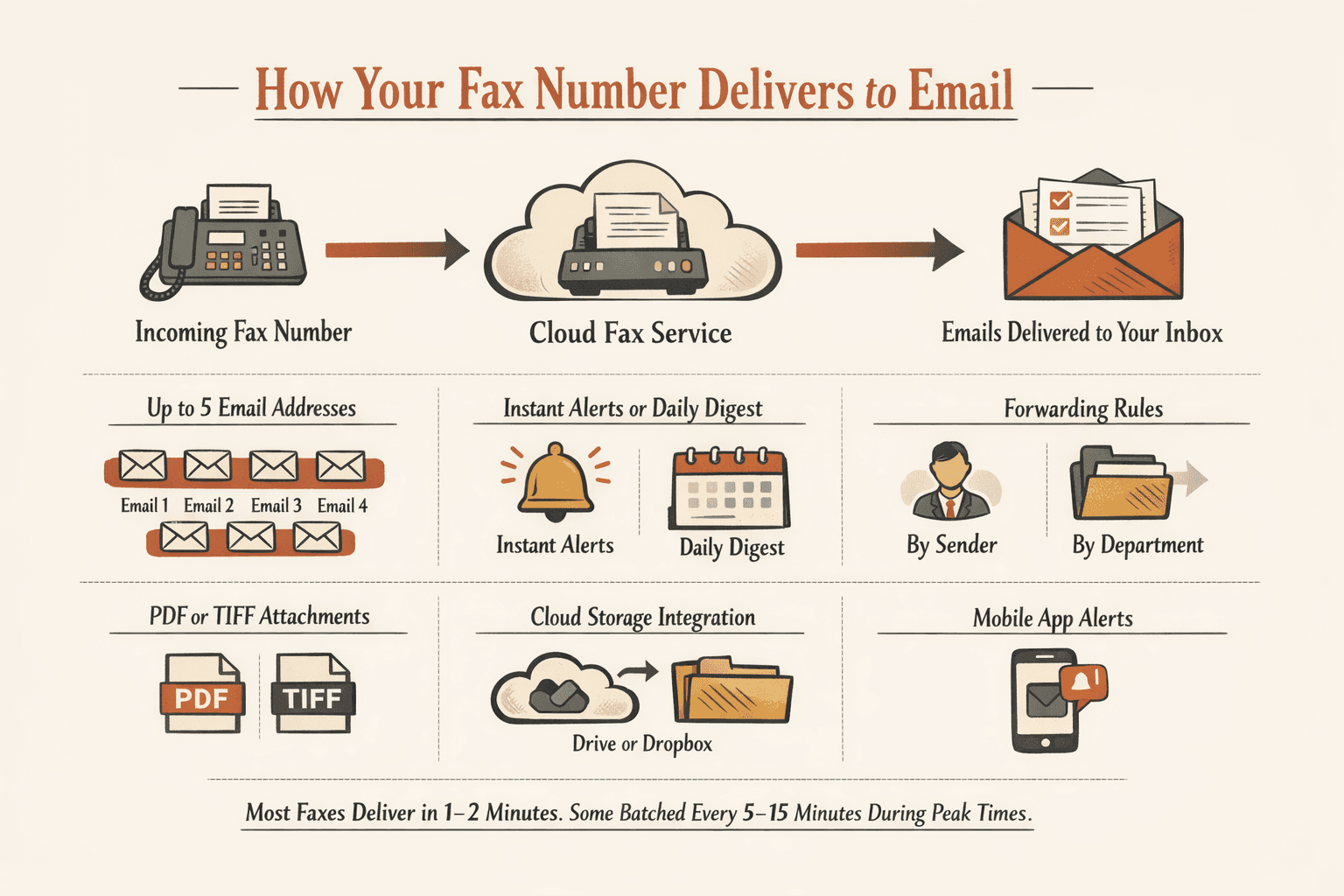
- Configure email delivery (1 minute): Enter the email address where you want to receive faxes. Most services support up to five email addresses for a single fax number. Choose PDF format—it’s more compatible than TIFF.
- Download the mobile app (2 minutes): iOS and Android apps let you receive faxes as push notifications and send directly from your phone. Not required, but convenient.
- Send a test fax (1 minute): Use the web interface or app to fax yourself a test document. You should receive it as an email attachment within 1-2 minutes.
You’ll have immediate access to send and receive faxes the moment your account is active. No waiting period, no hardware installation.

VoIP Fax Number Setup
If you’re using a VoIP provider like RingCentral or Bandwidth:
- Choose a VoIP provider with fax support (10 minutes): Not all VoIP services support faxing reliably. Look for providers that explicitly advertise T.38 fax relay—it’s the standard protocol that makes fax work over IP networks.
- Add fax to your plan (5 minutes): Most VoIP providers offer fax as an add-on feature ($5-15/month). Some include it in higher-tier business plans.
- Configure hardware if needed (10 minutes): If you’re connecting a physical fax machine to your VoIP line, you’ll need an ATA (analog telephone adapter) to convert the analog fax signal to digital VoIP. If you’re using cloud-based fax only, skip this step.
- Set delivery preferences (2 minutes): Choose whether faxes arrive by email, in your VoIP app, or both. Set your preferred file format (PDF recommended).
- Test transmission (5 minutes): Send a test fax to yourself. VoIP fax can be finicky—if test faxes fail, you may need to adjust codec settings or T.38 fallback behavior.
VoIP fax setup is more technical than online fax services. If you run into issues, you’ll need to dig into T.38 configuration settings or call your provider’s support team. For most users, an online fax service is simpler.
How to Set Up a Fax Number That Delivers to Email
Email delivery is built into every online fax service—you just need to configure it in your account settings.
Here’s the setup process:
- Access your account settings (1 minute): Log into your fax service’s web portal and find “Settings,” “Preferences,” or “Delivery Options.”
- Enter your email address (30 seconds): Add the email where you want to receive faxes. Most services support up to five email addresses per fax number, so you can deliver faxes to multiple team members.
- Choose notification preferences (1 minute): Decide whether you want instant notifications (every fax triggers an email) or digest mode (one daily summary). Most people prefer instant.
- Set up forwarding rules (2 minutes, optional): Some services let you create conditional rules—for example, faxes from certain numbers automatically forward to specific team members or departments.
- Configure file format (30 seconds): Choose between PDF or TIFF. PDF is more widely compatible and works on any device. TIFF is higher fidelity but requires special software to view.
- Test delivery (1 minute): Send a test fax to your new number. Check your inbox—the fax should arrive as a PDF attachment within 1-2 minutes. If it doesn’t, check your spam folder.
Most services deliver faxes instantly, but some batch deliveries every 5-15 minutes during high-traffic periods.
Email delivery options to configure:
- Immediate notifications - Get an email the moment a fax arrives (most common choice)
- Digest mode - Receive one daily summary with all faxes attached
- Multiple email addresses - Deliver faxes to your team, accounting department, or personal inbox simultaneously
- Cloud storage integration - Auto-save faxes to Dropbox, Google Drive, or OneDrive
- Mobile app alerts - Get push notifications on your phone in addition to email
If you need faxes routed to multiple people with different access rules, set up forwarding rules based on sender, time of day, or fax content. RingCentral Fax and similar services offer role-based delivery—for example, HR faxes go to one inbox, invoice faxes go to another.
How Do I Get a Fax Number to My Email
Sign up for an online fax service—received faxes automatically arrive in your inbox as PDF or TIFF attachments.
Here are five services that deliver faxes to email:
- eFax - $18.99/month for 170 pages; includes searchable fax archive and e-signature tools
- Fax.Plus - Free tier includes 10 pages total; paid plans start at $8.99/month for 200 pages
- RingCentral Fax - $12.99/month standalone or bundled with business phone plans; includes 750 pages
- Dropbox Fax (formerly HelloFax) - Free for 5 pages; $9.99/month for 300+ pages with cloud storage integrations
- MyFax - $12/month for 100 pages; includes web and mobile access
When a fax arrives, you’ll get an email with a subject line like “New fax from [sender number]” or “Fax received: [date/time].” The fax itself is attached as a PDF. Most services deliver faxes within 1-2 minutes of transmission—some batch deliveries every 5-15 minutes during peak hours.
Here’s how the top three services compare on email delivery features:
| Feature | eFax | Fax.Plus | RingCentral Fax |
|---|---|---|---|
| PDF format | ✓ | ✓ | ✓ |
| Storage duration | Unlimited | 90 days (free), unlimited (paid) | Unlimited |
| Email forwarding | Up to 5 addresses | Unlimited | Role-based forwarding |
| Mobile access | iOS, Android, web | iOS, Android, web | iOS, Android, web, desktop |
All three also store faxes in an online archive, so you can log in and download past faxes even if you deleted the email.
If you only need to receive a single fax—say, a signed contract or medical form—you don’t need a monthly subscription. Most services offer free trials with a handful of free pages, which is enough for one-off use.
How to Get a Free Fax Number Without a Landline
Several services offer free fax numbers with page limits—typically 5-10 pages per month or a short trial period before converting to paid plans.
Free fax number options:
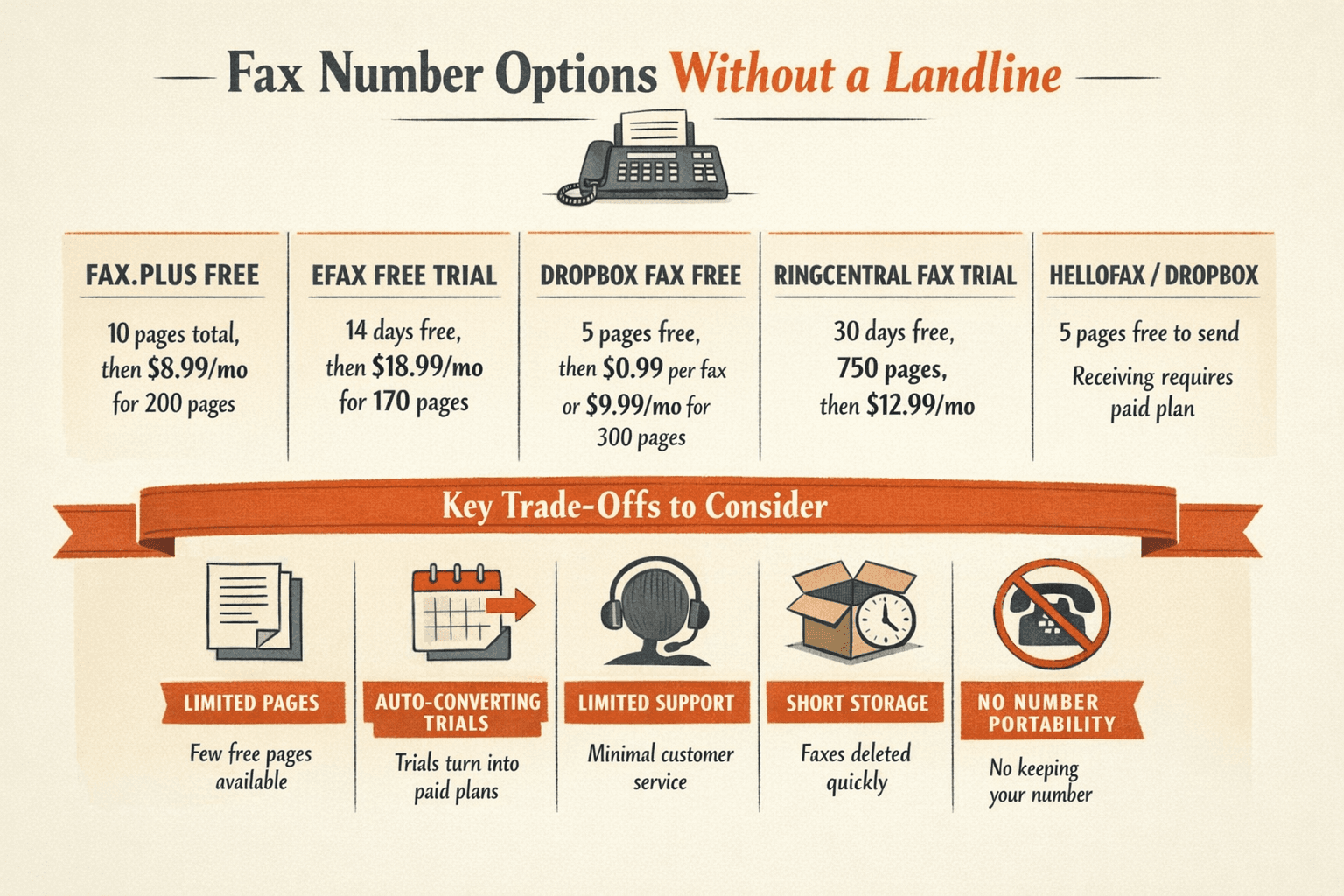
- Fax.Plus Free - 10 pages total (lifetime), then $8.99/month for 200 pages/month; includes basic email delivery and mobile access
- eFax Free Trial - 14 days free with full access to paid features, then $18.99/month; includes 170 pages/month
- Dropbox Fax Free - 5 pages free (no trial period), then pay-per-fax at $0.99/fax or subscribe at $9.99/month for 300 pages
- RingCentral Fax Trial - 30-day trial with 750 pages included, then $12.99/month
- HelloFax (now Dropbox Fax) - 5 pages free, no account required for sending; receiving requires a paid plan
The biggest trade-off with free plans is page limits and trial-to-paid transitions. Most free trials convert to paid subscriptions automatically—you’ll need to cancel before the trial ends or you’ll be charged. Some services make cancellation deliberately difficult, which is a common user complaint across the industry.
Here’s how free and paid fax services compare:
| Feature | Free Plans | Paid Plans ($10-30/month) |
|---|---|---|
| Monthly pages | 5-10 pages (or time-limited trial) | 100-unlimited pages |
| Number portability | ✗ No | ✓ Yes—keep your existing fax number |
| Customer support | Email only, slow response | Phone, chat, priority support |
| Storage duration | 7-30 days | Unlimited archive |
| Advertisements | Often includes branding or ads | Ad-free |
If you need to send or receive one fax and never think about it again, a truly free option is ThirtyFax—send up to 5 pages free with no account required. For anything beyond that, you’ll pay €4.99 for up to 20 pages with no subscription or recurring charges.
Pro tip: Read the fine print on “free” fax trials. The FTC’s Click to Cancel rule requires clear disclosures and easy cancellation, but many fax services still use dark patterns—like burying cancellation links or requiring phone calls to cancel. Set a calendar reminder before your trial ends.
FAQ
Do You Need a Fax Number to Send a Fax?
No, you only need a fax number if you want to receive faxes or need a return number printed on sent faxes. Sending is one-way—you can fax documents to any recipient without owning a fax number yourself.
A fax number is required for receiving capabilities. When someone sends you a fax, they need a number to dial—just like you need a phone number to receive phone calls. If you never plan to receive faxes, you don’t need your own number.
That said, having a return fax number can make you look more professional. Some recipients (banks, government agencies, legal offices) expect a return fax number on the cover page for verification or callback purposes. If you’re faxing to someone who might need to fax you back, get a number—even if it’s just a temporary one from a free trial.

Written by
Bernard Bado
I created ThirtyFax after needing to send a single fax and refusing to pay for a monthly subscription to do it. I write here about faxing, document workflows, and the surprisingly stubborn role fax still plays in modern business.
View author profile