
How to Fax the IRS (Fax Numbers Included)
The IRS doesn't have one universal fax number. It depends on which department and form type you're submitting. This guide lists all IRS fax numbers by department and form, plus how to fax documents successfully.
Quick Verdict
Yes, you can fax documents to the IRS, but there’s no single universal fax number. The correct number depends on which IRS department you need to reach and what type of document you’re sending.
This guide provides the complete list of IRS fax numbers organized by department and form type, plus step-by-step instructions for faxing documents to the IRS successfully. Whether you’re responding to a notice, submitting authorization forms, or requesting transcripts, you’ll find the exact fax number and process you need.
What Is the IRS Fax Number?
The IRS doesn’t have one universal fax number. Instead, the IRS uses different fax numbers for different departments, form types, and sometimes even taxpayer locations.
The correct fax number depends on what you’re submitting—whether it’s a tax authorization form, a transcript request, supporting documents for an audit, or a response to a specific notice. Most IRS notices include the appropriate fax number to use, and form-specific instructions provide location-based fax numbers that may change without notice. Always verify the current number before sending.
IRS Fax Numbers by Department
| Department/Purpose | Fax Number | What to Send |
|---|---|---|
| Centralized Authorization File (CAF) — Eastern/Southeastern States | 855-214-7519 | Forms 2848, 8821 for taxpayers in designated eastern states |
| Centralized Authorization File (CAF) — Western/Midwestern States | 855-214-7522 | Forms 2848, 8821 for taxpayers in designated western states |
| Centralized Authorization File (CAF) — International (U.S. taxpayers abroad) | 855-772-3156 | Forms 2848, 8821 for taxpayers outside the U.S. |
| Centralized Authorization File (CAF) — International (foreign filers) | 304-707-9785 | Forms 2848, 8821 sent from outside the United States |
| Correspondence Examination (campus-specific) | 855-233-8560, 855-216-0924, 855-235-6791, 855-233-8481, 855-648-6646 | Audit responses, supporting documentation (use the fax number on your specific IRS notice) |
| Collection/Levy Programs | Varies by case | Payment arrangements, levy releases (use fax number on your notice or as provided by your assigned agent) |
| Automated Collection System (ACS) | Varies by case | Collection responses (contact ACS for case-specific fax number) |
| Practitioner Priority Service | No general fax line | Contact 866-860-4259 for routing to appropriate department |
Important: Most IRS departments do not publish a general-use fax number. If you receive an IRS notice or letter, use the fax number printed on that notice. If no fax number is provided, call the phone number on the notice to confirm the correct fax destination.
IRS Fax Numbers by Form Type
| Form Number | Form Name | Designated Fax Number |
|---|---|---|
| 2848 | Power of Attorney and Declaration of Representative | 855-214-7519 (eastern states), 855-214-7522 (western states), 855-772-3156 (U.S. taxpayers abroad), 304-707-9785 (sent from outside U.S.) |
| 8821 | Tax Information Authorization | Same CAF numbers as Form 2848 above |
| 4506-T | Request for Transcript of Tax Return | 855-587-9604 (Austin), 855-298-1145 (Ogden), 855-821-0094 (Kansas City) — location-based |
| 4506-A | Request for a Copy of Exempt or Political Organization IRS Form | 855-653-9144 |
| 3115 | Application for Change in Accounting Method | 877-773-4950 (non-automatic changes), 844-249-8134 (duplicate copy of automatic change only) |
| W-7 | Application for IRS Individual Taxpayer Identification Number | No fax option — mail or apply through Acceptance Agent/IRS office |
Note: The IRS updates these numbers periodically without notice. Always verify against the current IRS webpage or your specific notice before faxing.
How to Fax Documents to the IRS
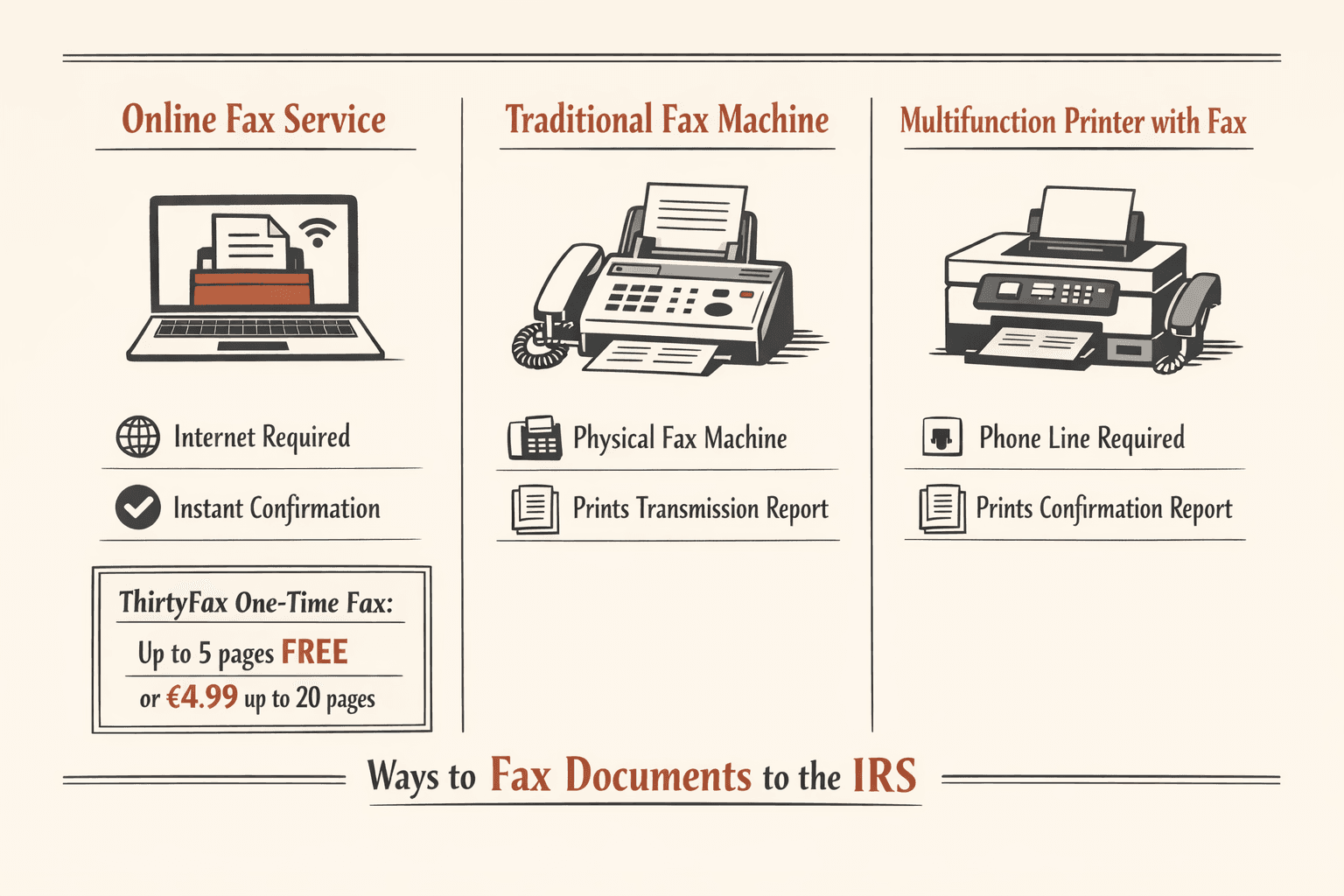
You can fax documents to the IRS using three methods:
- online fax service
- traditional fax machine
- multifunction printer with fax capability

Step 1: Verify the Correct IRS Fax Number
Check your IRS notice or letter for the specific fax number to use. If your notice includes a fax number, that’s always the correct destination—even if it differs from the form instructions or general charts.
How to confirm you have the right fax number:
- Look for the fax number in the “How to Respond” section of your IRS notice
- Cross-reference with the tables above if no notice-specific number is provided
- Check IRS.gov for the most current fax numbers by form type
- Call the phone number on your notice if you’re unsure which department to fax
- Verify location-based routing for forms like 2848, 8821, and 4506-T
The IRS warns that fax numbers may change without notice, so checking the current webpage or your notice immediately before sending is critical.
Step 2: Prepare Your Documents
Proper document preparation prevents processing delays and rejected submissions.
- Create a cover sheet: Include your name, taxpayer ID (SSN or EIN), phone number, number of pages, and a brief description of what you’re sending (e.g., “Response to CP75 notice,” “Form 2848 authorization”)
- Ensure all pages are legible: Check that text is dark and clear, signatures are visible, and no information is cut off at margins
- Arrange documents in the correct order: Cover sheet first, then completed forms, then supporting documentation in logical sequence
- Remove staples and paper clips: Fax machines jam on metal fasteners—use the original document order but send pages loose
- Verify all required signatures are present: Missing signatures are the most common reason for IRS rejections
- Make copies for your records: Keep a complete copy of everything you’re faxing, including the cover sheet and confirmation page
The IRS requires specific documentation for many forms and processes. Match the information on your forms exactly to your IRS records—typos in SSN, EIN, or legal name can delay processing by weeks.
Step 3: Choose Your Faxing Method
Online Fax Service (Recommended)
Online fax services are the most convenient option for most people—no equipment needed, instant delivery confirmation, and you can fax from any device with internet access.
- Choose a service: For a one-time IRS fax, ThirtyFax is the fastest option—send up to 5 pages free with no account required, or pay €4.99 flat for up to 20 pages. For regular faxing, subscription services like eFax or Fax.Plus offer monthly plans.
- Upload your documents: Convert paper documents to PDF using your phone’s scanner app or a desktop scanner, then upload to the fax service
- Enter the IRS fax number: Double-check the number—one wrong digit sends your documents to the wrong destination
- Add your cover page: Most services generate a cover page automatically, but verify it includes all required information (your name, taxpayer ID, phone number, page count)
- Send and save the confirmation: Online services provide instant confirmation receipts—save this as proof of transmission
The IRS specifically mentions that taxpayers can use online fax services when responding to notices, making them an officially accepted method.
Traditional Fax Machine
If you have access to a standard fax machine at your office or a business center like FedEx, this method works well.
- Load documents face down in the feeder: Check the diagram on your machine for correct orientation
- Dial the IRS fax number: Enter the full number including area code, then press Send or Start
- Wait for confirmation: The machine will print a transmission report showing successful delivery
- Save the confirmation page: This is your proof of delivery—attach it to your document copies
Multifunction Printer with Fax
All-in-one printers with fax capability work like traditional fax machines if you have a phone line connected.
- Set up your fax line: Connect a phone line to the fax port on your printer (not the printer’s network connection)
- Load documents in the document feeder: Follow your printer’s specific instructions for fax sending
- Enter the IRS fax number and send: Use the printer’s control panel to dial and transmit
- Print the confirmation report: Most printers offer this as an option after sending—always print and save it
Step 4: Include a Proper Cover Sheet
The IRS requires cover sheets to route faxed documents correctly. A missing or incomplete cover sheet can delay processing by weeks or cause your fax to be rejected entirely.
Required elements for an IRS fax cover sheet:
- Recipient department name (e.g., “IRS Centralized Authorization File” or “IRS Correspondence Examination”)
- Your full name exactly as it appears on your tax return
- Your Social Security Number (SSN), Employer Identification Number (EIN), or Individual Taxpayer Identification Number (ITIN)
- Your current phone number where the IRS can reach you
- Total number of pages including the cover sheet
- Brief description of contents (e.g., “Form 2848 Power of Attorney,” “CP75 notice response with supporting documents”)
- Date you’re sending the fax
- Your case number, notice number, or letter ID if you’re responding to IRS correspondence
For Form 3115 correspondence, the IRS also requires a statement indicating your intention to correspond by fax and your contact person’s fax number. Including this level of detail ensures your documents reach the right IRS employee.

Step 5: Send and Confirm Delivery
After sending your fax, verify successful transmission and follow up appropriately.
Confirmation best practices:
- Save your transmission report immediately—it’s your only proof of delivery
- Verify the report shows all pages sent successfully (check the page count)
- Call the IRS 2-3 business days after faxing to confirm receipt if your matter is time-sensitive
- Keep the confirmation report with your tax records for at least three years
- Note the date, time, and confirmation number on your document copies
Important timing context: A successful fax transmission doesn’t mean instant IRS processing. For example, Form 4506-A requests take up to 60 days to process, and authorization forms can experience processing delays even after successful delivery. Save your confirmation receipt and allow processing time before following up.
Is It Better to Fax or Mail to the IRS?
Fax is faster for transmission—your documents arrive immediately instead of 7-10 days by mail—but mail may be required for certain submissions or when certified delivery proof is needed.
| Factor | Fax | |
|---|---|---|
| Speed | Immediate transmission | 5-10 days delivery time |
| Confirmation | Instant transmission report | Certified mail receipt available |
| Cost | $0-5 per fax | $0.73 stamp (more for certified mail) |
| Security | Accepted by IRS for most document types | Accepted for all document types |
| IRS Acceptance | Yes, for most forms and notice responses | Yes, for everything including original returns |
| When to Use | Time-sensitive responses, IRS requests fax, supporting documents | Original signatures required, certified proof needed, no fax number provided |
Use fax when: You’re responding to an IRS notice with a deadline, the IRS specifically requests fax, or you need immediate transmission confirmation for time-sensitive documents like audit responses or payment arrangements.
Use mail when: The IRS requires original signatures (not all forms accept faxed signatures), you need certified mail proof of delivery for legal protection, your form doesn’t have a published fax number, or the IRS explicitly says “do not fax” in the form instructions.
Critical exception: The IRS does not accept original tax returns by fax—those must be mailed or e-filed. Additionally, some forms like W-7 (ITIN applications) focus on mail or in-person submission rather than fax. Always check the specific form instructions before choosing fax over mail.

FAQ
Can You Fax Documents to the IRS?
Yes, the IRS accepts faxed documents for most purposes including notice responses, supporting documentation, authorization forms, and transcript requests. However, you cannot fax original tax returns—those must be mailed or e-filed electronically.
Can I Fax the IRS?
Yes, both individual taxpayers and tax professionals can fax documents to the IRS. You must use the correct department-specific fax number rather than a general IRS line—most IRS notices include the appropriate fax number to use for responses.
Does the IRS Have a Fax Number?
The IRS has multiple fax numbers organized by department and form type rather than one central fax line. For example, authorization forms (2848, 8821) use location-based CAF fax numbers like 855-214-7519 or 855-214-7522, while transcript requests (4506-T) use separate RAIVS numbers by state. Always reference the tables above or your specific IRS notice for the correct number.

Written by
Bernard Bado
I created ThirtyFax after needing to send a single fax and refusing to pay for a monthly subscription to do it. I write here about faxing, document workflows, and the surprisingly stubborn role fax still plays in modern business.
View author profile