
How Does Fax Work? A Complete Guide
Fax converts documents into audio signals, transmits them over phone lines, then reconstructs them as images. This guide explains the scanning, encoding, transmission, and decoding process.
Quick Verdict
Fax works by converting documents into audio signals that transmit over phone lines (or the internet), then reconverts those signals back into images at the receiving end. The process uses standardized protocols that have remained largely unchanged since the 1980s—documents are scanned, encoded as audio tones, transmitted, decoded, and printed.
Despite being a decades-old technology, fax remains entrenched in healthcare, legal, and government sectors. The CMS announced in March 2026 a final rule to phase out fax for certain healthcare claims—a move projected to save $781.98 million per year. That kind of number only makes sense if fax is still deeply embedded in institutional workflows.
How Does Fax Work?
Fax technology functions end-to-end through a coordinated handshake between two machines that agree on transmission parameters, then exchange document data as modulated audio signals.
The Fax Transmission Process
Here’s how a fax moves from sender to receiver:
- Call establishment (5-10 seconds): The sending fax machine dials the recipient’s fax number. The receiving machine picks up and sends a tone confirming it’s ready.
- Capability negotiation (2-5 seconds): Both machines identify their capabilities—transmission speed, page size, resolution, and whether they support error correction mode (ECM). This handshake is defined by the ITU-T T.30 protocol, which governs fax procedures over telephone networks.
- Document scanning and digitization (varies): The sending machine scans each page, converting it into a digital image at a standard resolution—typically 1728 pixels per scan line horizontally and 3.85 or 7.7 lines per millimeter vertically.
- Conversion to audio tones (during transmission): The digital image is compressed, then converted into audio signals using modem encoding. Fax machines typically use V.17 modems operating at speeds up to 14,400 bits per second.
- Transmission over phone line (1-2 minutes per page): The audio signals travel over the phone network. Each page is transmitted as a series of tones representing black and white pixels.
- Audio signal decoding (real-time): The receiving machine’s modem demodulates the audio back into digital image data.
- Image reconstruction and printing (30-60 seconds per page): The receiving machine reconstructs the page from the decoded data and prints it. If ECM is enabled, the machines verify each transmitted block and request retransmission for any corrupted segments.
- Post-message confirmation (5 seconds): The receiving machine sends a confirmation signal. The sending machine logs the transmission status and hangs up.

The Technology Behind Fax Signals
Documents aren’t sent as files—they’re sent as raster images encoded into audio frequencies. The fax machine scans each line of the page, then converts the black-and-white pixel data into modulated tones that can travel over a phone line.
Here’s what makes that work:
- Image sensor technology - A CCD or contact image sensor scans the document line-by-line, capturing grayscale or bitonal (black/white) pixel data
- Modem encoding/decoding - The V.17 modem standard converts digital image data into audio signals for transmission, then decodes those signals back into image data on the receiving end
- Handshake protocols - The T.30 signaling standard defines how fax machines identify themselves, negotiate capabilities, and coordinate transmission phases
- Error correction methods - ECM detects corrupted data blocks during transmission and requests retransmission, though it only works when both machines support it and can slow down transmissions on poor lines
The key difference from modern file transfer: fax machines don’t send PDFs or images as data files. They send an audio representation of the document that’s decoded back into an image on the other end.

How Does Fax Work on iPhone
iPhone faxing works through third-party apps that convert documents into fax-compatible format and transmit them via the internet—no phone line required. Apps like Genius Fax and Fax Pro let you scan or import PDFs, then send them to standard fax numbers through cloud-based fax infrastructure.
Digital Fax vs. Traditional Fax on Mobile
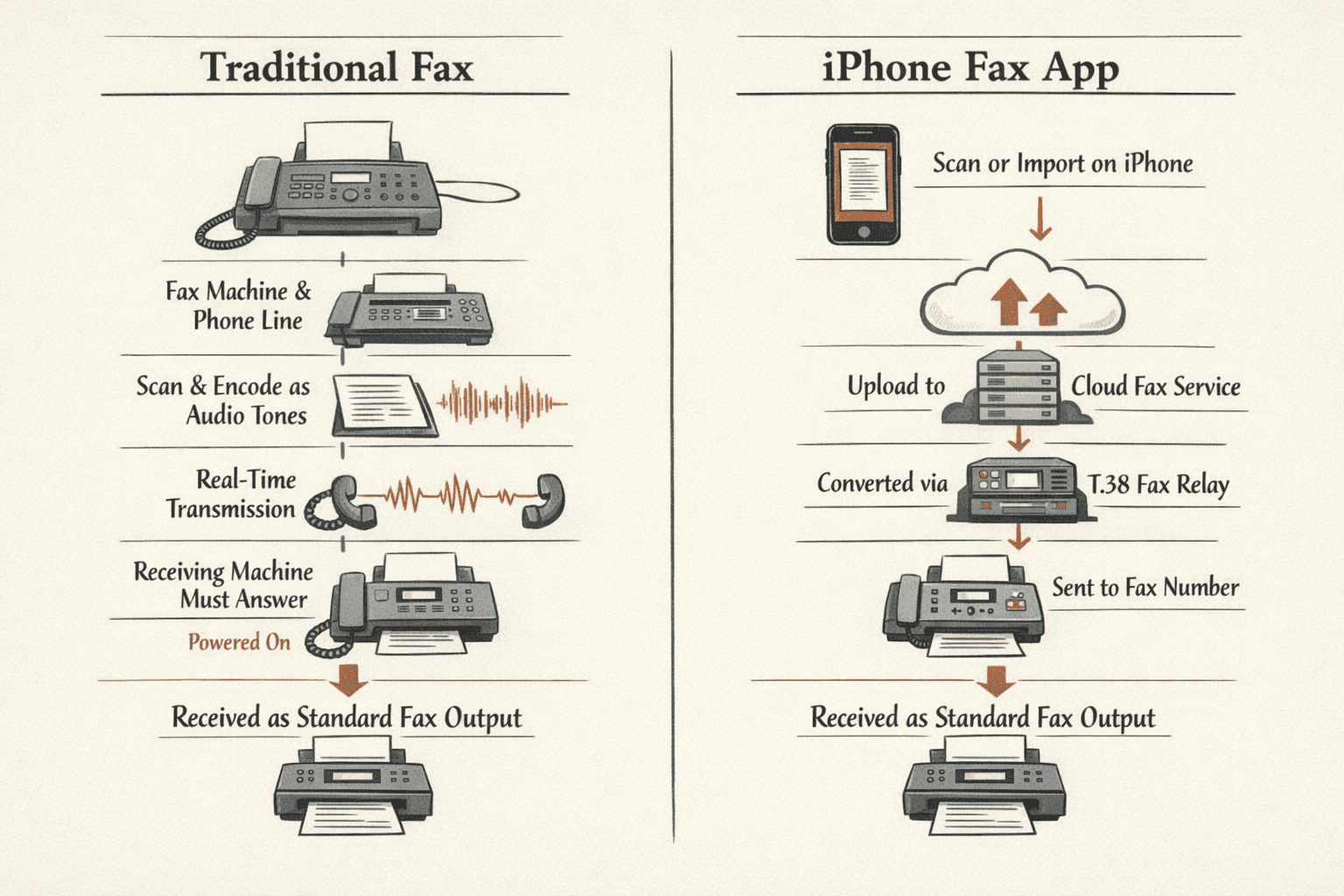
Traditional fax:
- Requires a physical fax machine connected to a phone line
- Document is scanned, encoded as audio tones, and transmitted in real-time
- Receiving machine must be powered on and answer the call
iPhone fax app:
- No phone line—transmission happens over cellular or Wi-Fi
- Document is uploaded to a cloud fax service as a digital file
- The service converts it to fax format and delivers it to the recipient’s fax number
- The conversion happens on back-end servers using fax relay protocols like T.38, which translate between digital files and traditional fax signaling
The bridge: Cloud fax services maintain compatibility with traditional fax machines by converting your digital document into the same audio-based format a physical fax machine would produce. The recipient’s fax machine receives it exactly as if you’d sent it from a traditional machine.
How to Fax From Computer
Computer faxing works through online fax services or fax software that connects to fax networks digitally—you upload a document, and the service handles the transmission to the recipient’s fax number.
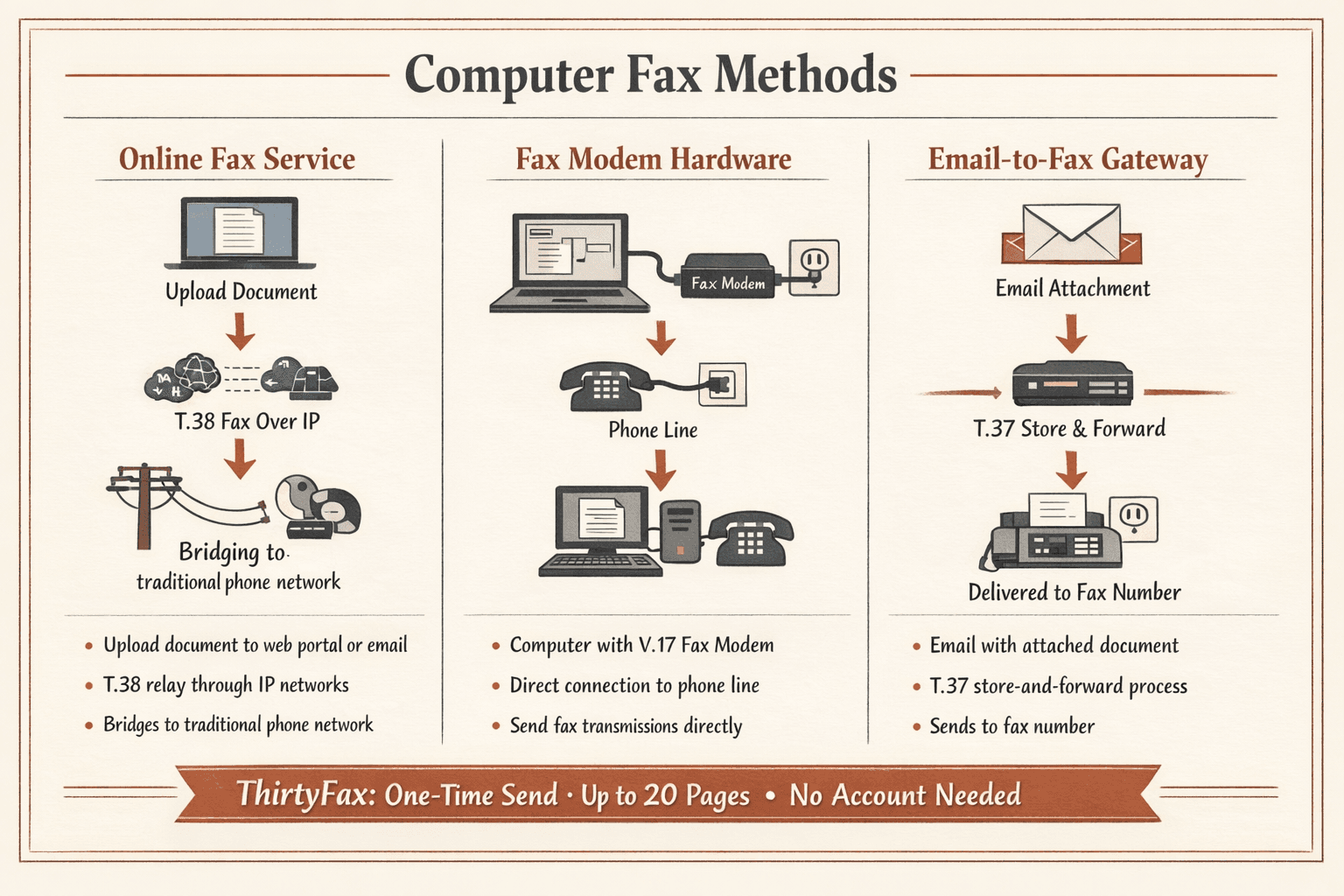
Computer Fax Methods
Online fax services (cloud-based conversion)
You upload a document through a web portal or email. The service converts your file into fax format and transmits it using T.38 fax relay over IP networks, then bridges into traditional phone networks to reach the recipient’s fax machine. This is the most common method today.
If you just need to send a single fax with no account setup or subscription commitment, ThirtyFax offers a straightforward option: pay once, upload your document, and send up to 20 pages instantly.
Fax modem hardware (direct phone line connection)
An older approach—you install a V.17-compatible fax modem in your computer and connect it to a phone line. The computer software controls the modem to send fax transmissions directly, just like a physical fax machine would.
Email-to-fax gateways (email converted to fax transmission)
You send an email with the document attached. A gateway service receives it, converts the attachment to fax format using T.37 store-and-forward protocols, and delivers it to the recipient’s fax number.
The key difference: With computer faxing, your document stays digital longer in the pipeline. The conversion to fax-compatible audio signals happens at a gateway or cloud service rather than in your local hardware.
Why Fax Still Works This Way
Fax technology hasn’t fundamentally changed since the 1980s because of three factors: entrenched technical standards, massive infrastructure investment, and regulatory acceptance. The ITU-T T.30 protocol that governs fax transmission today is essentially the same recommendation published decades ago—changing it would break compatibility with millions of existing machines.
Institutional inertia is real. When CMS moved to phase out fax for certain healthcare claims in 2026, it was newsworthy precisely because fax had remained the default for so long.
Technical Standards That Make Fax Universal
These specifications ensure any fax machine can communicate with any other:
- T.30 protocol - Defines the call establishment, capability negotiation, message transmission, and call release phases for all fax sessions over phone networks
- T.4 image coding - Specifies Group 3 fax image format, including 1728 pixels per scan line and standard vertical resolutions of 3.85 or 7.7 lines/mm
- Phone line compatibility requirements - Fax machines must operate over standard analog phone lines using audio frequencies that survive PSTN switching and transmission
- Resolution standards - Horizontal resolution is fixed at 204 dots per inch; vertical resolution is either 98 or 196 dpi depending on mode
- Transmission speed standards - V.17 modems support speeds up to 14,400 bit/s, with fallback rates negotiated during the handshake
Even modern internet fax services must respect these standards. They use T.38 gateway protocols to translate between IP networks and traditional fax signaling—preserving interoperability while avoiding the timing constraints of raw phone-line transmission.

Common Fax Technology Questions
Does fax require a phone line?
Traditional fax machines require phone lines because the T.30 protocol was designed for document transmission over the general switched telephone network. But modern online fax services use internet connections instead—they convert your document to fax format and deliver it through cloud-based fax relay infrastructure that bridges into traditional phone networks when needed.
What makes fax more secure than email?
This is overstated. Fax isn’t inherently more secure—it’s a point-to-point transmission that’s harder to intercept in transit compared to email servers that store copies. But according to HHS guidance, HIPAA doesn’t prohibit email for protected health information if appropriate safeguards are used. The real difference: fax has decades of regulatory acceptance, while email requires documented security measures.
Can you fax over internet?
Yes. Multiple methods exist: fax pass-through (sending audio tones over VoIP), real-time fax relay (T.38 packetization), and store-and-forward (T.37 email-based transport). T.38 fax relay is most common—it demodulates incoming fax signals, translates them into IP packets with redundancy to handle network jitter, and re-encodes them for delivery.
What happens if a fax fails mid-transmission?
If both machines support Error Correction Mode, corrupted data blocks trigger retransmission requests so the receiving machine can reconstruct the page correctly. Without ECM, transmission errors produce garbled pages or incomplete documents. Most fax machines log transmission status—successful delivery, busy signal, or communication error—so you know whether the fax went through.

Written by
Bernard Bado
I created ThirtyFax after needing to send a single fax and refusing to pay for a monthly subscription to do it. I write here about faxing, document workflows, and the surprisingly stubborn role fax still plays in modern business.
View author profile