
How Does a Fax Machine Work?
Fax machines scan documents, convert them to audio signals, transmit over phone lines, then decode and print on the other end. This guide explains the process, key components, and modern variations.
Quick Verdict
A fax machine scans a document, converts it into audio signals, transmits those signals over a phone line, and then the receiving machine decodes those signals and prints the document. It’s surprisingly analog—your text and images literally turn into sound, travel through copper wires, and reassemble on the other end.
This article will walk you through the step-by-step process, explain the key components that make it work, and cover variations like wireless fax machines and home fax setups.
How Does a Fax Machine Work
The fax process is a sender-to-receiver pipeline: you feed a document into the sending machine, it scans and encodes the page, transmits that data as audio tones over a phone line, and the receiving machine decodes the tones and prints an identical copy. The whole exchange follows international standards so fax machines from different manufacturers can talk to each other.
Here’s the breakdown:
- Document scanning and digitization (a few seconds): The fax machine’s scanner—typically a Contact Image Sensor—moves across your document and converts text and images into a digital bitmap. It’s reading your page pixel by pixel.
- Conversion to audio tones (instantaneous): The digitized image gets encoded using compression standards like Modified Huffman or JBIG. Then the fax modem converts those bits into audio frequencies—literally sounds—that can travel over a standard phone line.
- Transmission over phone line (3-60 seconds per page): The sending machine dials the receiving machine’s number. Once connected, the two machines perform a quick “handshake” to agree on transmission speed and image quality. Then the actual page data flows as audio signals. Modern Super G3 fax machines can send a page in about 3 seconds under good conditions.
- Reception and decoding (near real-time): The receiving machine’s modem listens to the incoming audio tones and decodes them back into digital image data. Error correction protocols catch and fix transmission glitches automatically.
- Printing on receiving end (a few seconds): Once the page is fully received and decoded, the printer mechanism outputs a physical copy. Many modern machines also store received faxes in memory or forward them to email.

The key insight: faxing turns visual information into sound, sends that sound through the phone system, and turns it back into an image on the other end. It’s a clever hack that lets document transmission work over infrastructure built for voice calls.
Key Components of a Fax Machine
A fax machine needs several specialized parts working together to scan, encode, transmit, receive, decode, and print documents.
- Scanner/optical sensor: Usually a Contact Image Sensor that moves across your document and captures it line by line as digital image data.
- Modem: The component that converts digital image data into audio tones for transmission and decodes incoming audio back into images. Modern fax machines use V.34 modems capable of 33.6 Kbps.
- Phone line connection: A standard RJ-11 jack that plugs into the same wall outlet as a landline phone, letting the fax machine dial out and receive calls.
- Printer mechanism: The output side—typically laser or inkjet—that converts received fax data into a physical printed page.
- Memory storage: Modern fax machines can hold thousands of pages in memory, useful for storing received faxes when you’re out of paper or forwarding them digitally instead of printing.
- Control panel: The interface where you enter fax numbers, adjust settings like resolution and contrast, and manage sending and receiving.

How Does a Wireless Fax Machine Work
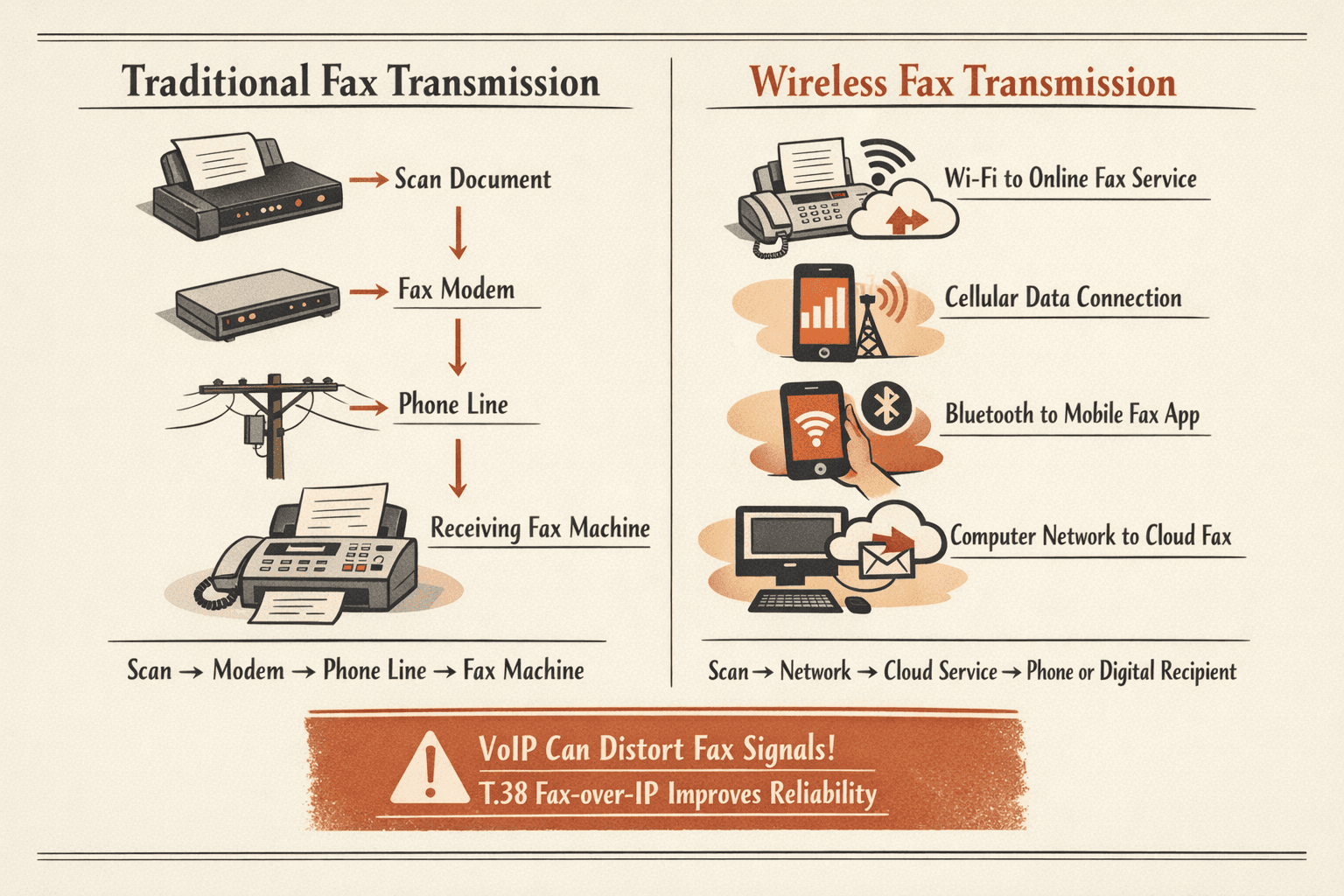
Wireless fax machines eliminate the need for a dedicated phone line by using WiFi or cellular connections to send faxes through internet fax services. You still scan the document the same way, but instead of transmitting audio over copper wires, the machine sends the digitized fax over your network to a cloud service that handles the actual phone-line delivery.
The key difference: traditional fax machines connect directly to the phone system, while wireless models route through your internet connection first. The scanning and printing process stays the same—it’s just the transmission method that changes. Many so-called “wireless” fax setups aren’t standalone devices but rather multifunction printers that send faxes through a networked computer or online fax service.
Wireless fax machines typically transmit documents in one of these ways:
- Through WiFi to online fax service: The machine connects to your network and sends scanned documents to a cloud-based fax provider that completes the transmission over traditional phone lines.
- Via cellular data connection: Some models have built-in cellular modems that send faxes directly through mobile networks without needing your office WiFi.
- Using Bluetooth pairing with smartphones: You scan a document on the machine, which pairs with your phone and uses a mobile fax app to handle transmission.
- Through computer network integration: The fax machine acts as a network printer—you “print” to it from your computer, and it converts that print job into an outgoing fax.
One important caveat: many fax machines struggle with VoIP (Voice over Internet Protocol) connections because fax signals get distorted when packetized for internet transmission. If you’re using a wireless setup, make sure your service supports T.38 fax-over-IP protocol for reliable delivery.
How Does a Fax Machine Work at Home
Home fax machines work the same way as office models but are typically smaller, connect to home phone lines or internet, and often come as part of multifunction printer-scanner-copier devices. If you still have a landline, you can plug a fax machine directly into that phone jack and send faxes the traditional way.
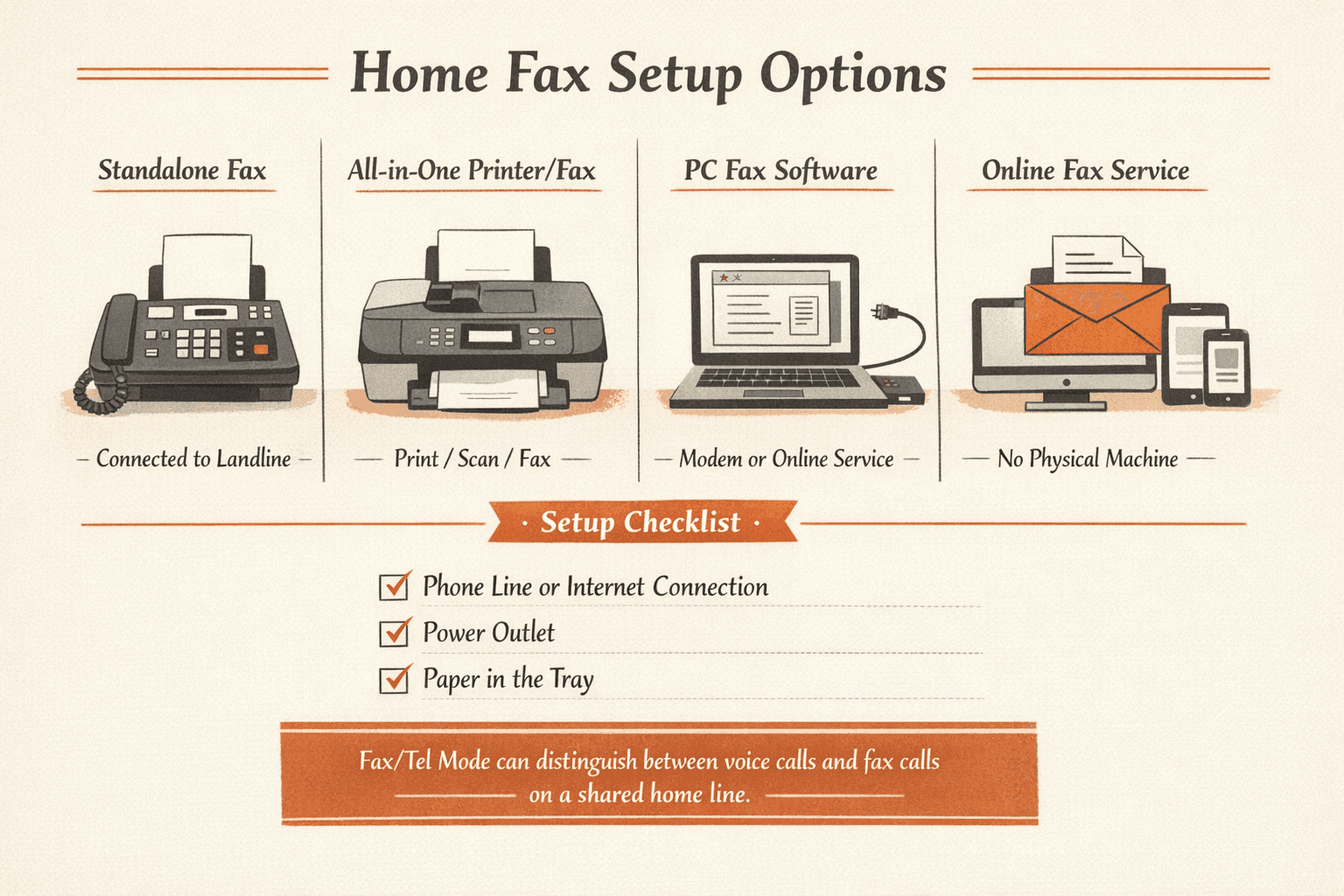
To set up a home fax machine, you need three things: a phone line or internet connection, a power outlet, and paper loaded in the tray. Most home users today skip dedicated fax machines entirely and use all-in-one printers with fax capability or computer-based solutions.
Common home fax machine configurations:
- Standalone fax connected to landline: The traditional setup—plug the fax machine into your home phone jack, and it can send and receive faxes independently. This is increasingly rare as landlines disappear.
- All-in-one printer with fax capability: Many home printers with automatic document feeders include fax functionality, letting you scan, copy, print, and fax from one device.
- Computer-based fax software: Your computer dials out through a modem or sends faxes through an online service—you select “fax” from the print menu, enter the destination number, and send without ever touching paper.
- Online fax service accessed from home: No physical machine required—you upload documents through a web portal or email them to your fax number, and the service handles transmission. This is the most common “home fax” setup today.
If you’re setting up a home fax machine on a line that also handles voice calls, be aware that you’ll need to configure it correctly. Most machines have a “Fax/Tel Mode” that attempts to detect whether an incoming call is a fax or a voice call, but this can be finicky and may require you to manually pick up the handset when you hear the fax tone.
For occasional home faxing, you don’t need a subscription service. ThirtyFax lets you send a fax online—one page, up to 5 pages, no account required—for situations where you need to fax a form once and never think about it again.
The Technology Behind Fax Transmission
Fax machines from different manufacturers can communicate because they follow shared encoding standards and protocols, most importantly ITU-T T.30, the international standard for document transmission over phone networks. When two fax machines connect, they exchange “capability messages” to negotiate the fastest transmission speed and best image quality both devices support.
The actual data transmission works through analog audio signals carrying digital information. Your scanned document gets compressed using algorithms like Modified Huffman (for simple black-and-white text) or JBIG (for higher-quality images), then encoded into audio tones by the modem. Those tones travel through the phone system as sound—if you picked up a phone during an active fax transmission, you’d hear a screeching noise because you’re literally listening to your document.
Transmission speed and resolution depend on several factors: line quality, modem capabilities, and the settings you choose. Modern fax machines support multiple modulation standards—V.27ter, V.29, V.17, and V.34—and automatically fall back to slower speeds if the phone line is noisy. Super G3 machines using V.34 modems can hit 33.6 Kbps and send a standard page in about 3 seconds, while older Group 3 machines on V.17 might take 30-60 seconds per page.

Evolution of Fax Technology
Facsimile transmission dates back to 1843, and the first commercial fax system launched between Lyon and Paris in 1863. But fax machines didn’t become common office equipment until the 1980s, when affordable digital models replaced earlier analog systems that were slow and expensive.
The technology has evolved through several key stages:
- Early analog fax machines: Large, expensive devices that used photocells and chemical processing to transmit documents over telegraph lines. Transmission could take 6 minutes per page.
- Digital fax with improved speed/quality: By the 1980s, digital fax machines using Group 3 standards became the norm, cutting transmission time to under a minute per page and making faxing affordable for small businesses.
- Internet fax services: In the 2000s, services began offering fax-over-IP, letting users send and receive faxes through email or web portals without a physical machine. This opened faxing to anyone with an internet connection.
- Mobile fax apps: Smartphones can now send faxes directly from the device using online services, eliminating the need for any dedicated hardware. You scan with your camera and transmit through an app.
Despite predictions that email would kill faxing, the technology persists—especially in healthcare, legal, and government sectors—because fax transmissions are considered more secure and legally binding than unencrypted email. Modern fax setups increasingly route through the internet under the hood while maintaining compatibility with traditional phone-line fax machines.
FAQ
Why Do Fax Machines Have Phones
Fax machines have phones (handsets) because they share the same phone line infrastructure as voice calls, and the handset lets you call the recipient before sending a fax or switch between voice and fax mode on a shared line. It’s a carryover from when businesses typically had one phone line handling both voice calls and fax transmissions.
The handset also helps with manual fax initiation: you can call the receiving fax number, listen to verify the machine answers with a fax tone, then press “send” on your machine to start transmission. Some machines require you to hear a click through the handset and then hang up to let the fax complete, especially when operating in Fax/Tel mode on a shared home line.
Why Do Fax Machines Make That Noise
The noise is the sound of the two fax machines performing a “handshake”—exchanging information about their capabilities (speed, resolution, error correction) and establishing the connection through audio tones. The initial beeps and chirps you hear are standardized signaling tones defined by ITU-T T.30 that tell each machine what the other can support.
After the handshake, the longer screeching sound is the actual data transmission—your document converted into audio frequencies traveling over the phone line. The specific tones and modulation patterns carry the digital image data as sound. It’s loud and distinctive because fax machines need strong, clear signals to reliably transmit documents over sometimes-noisy phone connections.

Written by
Bernard Bado
I created ThirtyFax after needing to send a single fax and refusing to pay for a monthly subscription to do it. I write here about faxing, document workflows, and the surprisingly stubborn role fax still plays in modern business.
View author profile