
eFax Review: Pricing, Features, Alternatives
eFax charges $18.99/month for 170 pages—good for regular business faxing, but pricey if you fax occasionally. HIPAA compliance costs $49.99/month minimum.
Quick Verdict
eFax works well for small businesses that fax regularly and need a professional setup with local/toll-free numbers. If you need HIPAA compliance, you’ll pay $49.99/month minimum for eFax Protect. For one-time faxing, ThirtyFax is a better fit—€4.99 flat with no subscription or account required.
eFax is a subscription-based online fax service that lets you send and receive faxes through email, mobile app, or web portal—no physical fax machine required.
It’s been around since 1995 and serves 25M+ users, making it one of the most established names in digital faxing.
Plans start at $18.99/month for 170 pages, which positions eFax in the premium tier of the market—fine if you need compliance features or a polished interface, but pricey if you’re just faxing occasionally.
eFax Pricing
eFax uses a tiered monthly subscription model tied to page allowances and feature access. Plans include a dedicated fax number (local or toll-free) and cloud storage, with overage charges if you exceed your monthly page limit.
| Plan | Monthly Cost | Pages Included | Overage Fee | Key Difference |
|---|---|---|---|---|
| Plus | $18.99 | 170 pages | $0.10/page | Email/web/mobile faxing, basic features |
| Pro | $24.99 | 275 pages | $0.10/page | Increased page allowance |
| Protect | $49.99 | 100 sent + 200 received | $0.10/page | HIPAA/SOX/GLBA compliance, 256-bit AES encryption |
| Corporate | Quote-based | Custom | Custom | Enterprise integrations (SAP, CRM, EMR), BAA support |
Additional cost considerations:
- Free trial: 14 days on all plans, but requires payment method upfront
- Annual discount: Annual plans offer savings but lock you into longer commitment
- Extra numbers: Additional local or toll-free numbers available as add-ons
- Cancellation friction: eFax includes a dedicated cancellation help page, which suggests users encounter friction—common complaint across reviews

eFax Features
eFax positions itself as a full-featured cloud fax platform with multi-channel access and enterprise-grade options. It’s been in the market since 1995, which means mature infrastructure but also some legacy interface quirks that users report in reviews.
Sending and Receiving Faxes
- Email-to-fax: Compose in any email client (Gmail, Outlook, iCloud, Yahoo Mail), address to
number@send.efax.com, attach your document, and send—your email body becomes the optional cover page - Mobile app: Available for iPhone, iPad, and Android—attach up to 20 documents (100MB total), preview before sending, and track real-time progress in the Sent folder
- File format support: Accepts nearly 200 file formats including PDF, JPEG, Microsoft Office, and TIFF
- Delivery confirmation: Email notifications when faxes are successfully transmitted
- Cloud storage: Received faxes are delivered to your inbox and also stored in the Message Center for later access, forwarding, or download
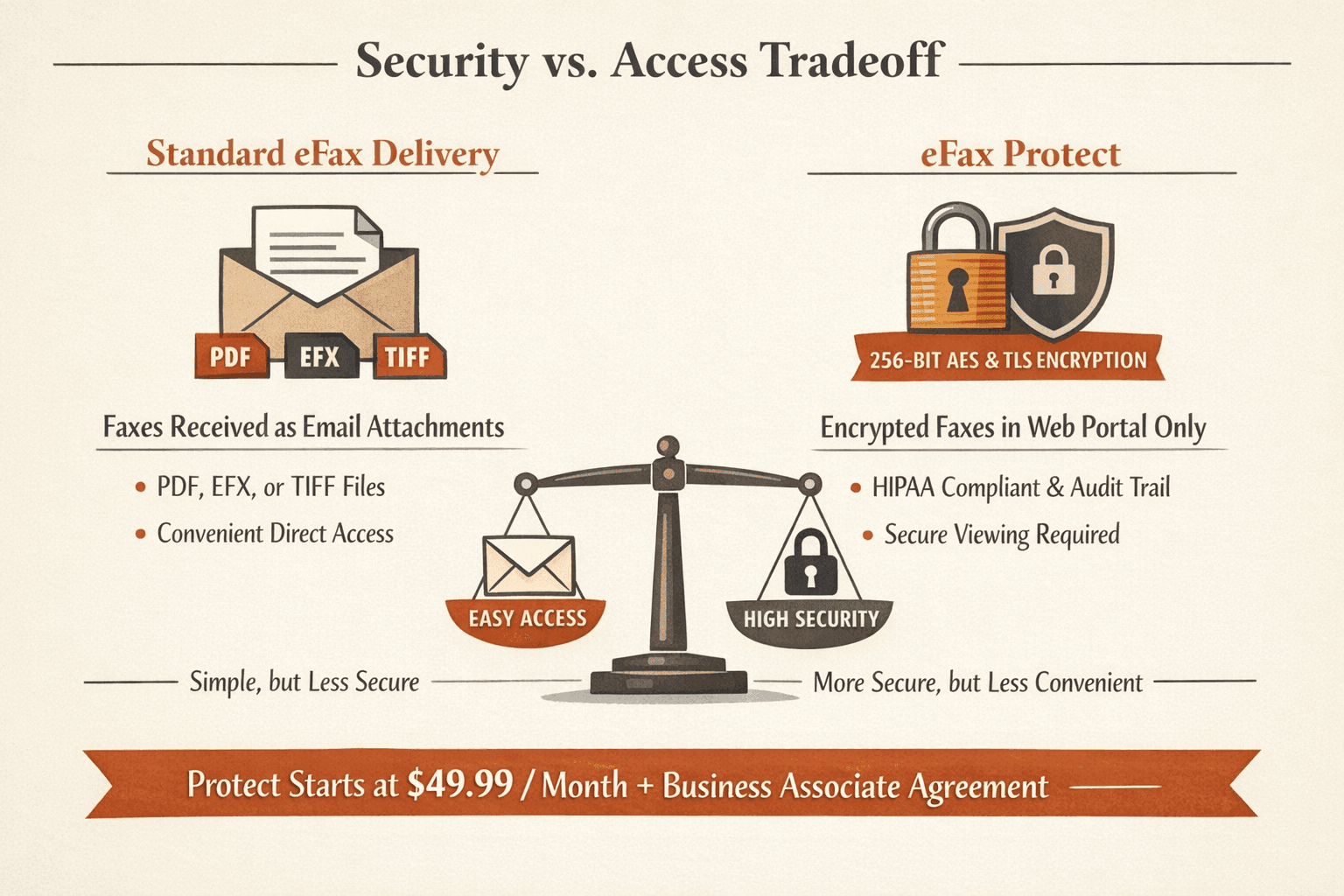
- Attachment format options: Choose how you receive faxes—PDF, EFX, or TIFF
Integrations and Compatibility
- Email clients: Works with Gmail, Outlook, iCloud, Yahoo Mail—any provider that supports standard email addressing
- Mobile platforms: Native apps for iOS and Android, optimized for sending photos and scanned documents
- Browser access: Web portal accessible from any browser for managing faxes, account settings, and billing
- Enterprise integrations: eFax Corporate supports Microsoft Office, SAP, CRM, EMR, and ERP systems—but this is an expensive, quote-based tier, not a standard feature
Security and Compliance
- Encryption: eFax Protect and Corporate use 256-bit AES and TLS encryption
- HIPAA compliance: Available on Protect ($49.99/month minimum) and Corporate tiers with signed Business Associate Agreement
- Audit trails: Detailed logging on eFax Business (part of Protect/Corporate) for regulated industries—tracks who sent what, when, to whom
One important nuance: if you enable AES-256 encryption on eFax Protect, received faxes must be viewed through the web portal rather than directly from email attachments—a security tradeoff that adds friction.
What Is E-Fax
E-fax (or online fax, digital fax) is faxing over the internet using email, web portals, or mobile apps instead of a physical fax machine and phone line. It performs the same document transmission function as traditional faxing but routes everything through cloud infrastructure rather than analog telephone networks.
The big shift: no hardware, paper, toner, or dedicated fax line required. E-fax services handle the conversion from digital files to fax protocol behind the scenes, so the recipient’s machine—whether traditional or digital—receives a standard fax transmission.
Three key characteristics of e-fax:
- No physical machine — everything happens through software (email, apps, web)
- Internet-based transmission — faxes route over the internet, not phone lines
- Works with traditional fax machines — digital senders can reach analog recipients (and vice versa)
E-fax remains relevant in industries like healthcare and legal because faxing is still permitted for transmitting protected health information when reasonable safeguards are used—something email alone doesn’t always satisfy.
How Does E-Fax Work
E-fax services convert your digital files into fax transmissions and route them over the internet to the recipient’s fax number. Instead of dialing through a phone line, the service acts as a bridge: you upload a document via email or app, the service translates it into fax protocol, and the recipient receives it on their machine (traditional or digital) as a standard fax.
The e-fax process:
- Upload your document — Attach a PDF, Word file, or other supported format through email, mobile app, or web portal
- Address the fax — Enter the recipient’s fax number (often formatted as
number@service.comfor email-to-fax) - Service converts the file — The e-fax platform translates your digital document into T.30 fax protocol (the standard fax machines understand)
- Transmission over internet — Your fax routes through the service’s servers to the recipient’s number, either as a direct internet delivery (if they use e-fax) or through a gateway to traditional phone lines
- Delivery confirmation — You receive an email notification once the fax is successfully transmitted, often with a timestamp and page count
The recipient doesn’t need to know or care whether you sent via email or a physical fax machine—it arrives the same way on their end.

How to Send a Fax With eFax
eFax offers three ways to send: email, mobile app, or web portal. Here’s the step-by-step for each.
Via Email
- Open your email client (2 minutes): Works with Gmail, Outlook, iCloud, Yahoo Mail, or any standard email provider
- Address the fax: In the “To” field, enter the recipient’s fax number followed by
@send.efax.com(e.g.,15551234567@send.efax.comfor a U.S. number) - Attach your document: Add your file (PDF, Word, JPEG, etc.)—supports nearly 200 formats
- Optional: write a cover page: Anything you type in the email body becomes the cover page—leave blank if you don’t need one
- Send: Hit send, and eFax converts and transmits your fax—you’ll get an email confirmation once it’s delivered
Via eFax Mobile App
- Open the app (1 minute): Available for iPhone, iPad, and Android
- Tap “Send Fax”: Select your document from your device (or take a photo if you’re scanning something on the spot)
- Attach files: Add up to 20 documents, 100MB total per fax
- Enter recipient details: Add the fax number and optional cover page text
- Preview and send: Review your fax, hit send, and track progress in real-time from the Sent folder
Pro tip: The app is optimized for sending photos and scans, so if you’re faxing a signed form you just photographed, use the app instead of email.
Via eFax Web Portal
- Log into MyPortal (2 minutes): Go to eFax.com and sign in to your account dashboard
- Click “Send Fax”: Opens the web-based send form
- Upload your document: Drag and drop or browse to select your file
- Enter recipient information: Add the fax number and optional cover page details
- Confirm and send: Review everything, click send, and wait for email confirmation
The web portal also lets you access received faxes, forward them to colleagues, or download them for storage—useful if you need to manage everything from one interface without juggling email.

eFax Alternatives
eFax isn’t your only option—and it’s definitely not the cheapest. If you’re faxing regularly, subscription services like Fax.Plus and MyFax offer similar features at lower monthly costs. If you’re sending one fax and never looking back, ThirtyFax is a better fit.
ThirtyFax
ThirtyFax is the only service that lets you send a fax right now with no account, no subscription, and no surprises. Free tier covers 1 fax up to 5 pages (with branding). Paid tier is €4.99 flat for up to 20 pages with no branding—transparency at checkout, no hidden fees, no commitment.
Key advantage over eFax: If you need to fax once, you shouldn’t have to sign up for a $18.99/month plan and remember to cancel. ThirtyFax solves that—pay once, send, done.
Fax.Plus
Fax.Plus offers a modern, polished UX with freemium pricing: 10 pages free (lifetime total), then $8.99/month for 200 pages on the Basic plan. Integrates cleanly with Google, Microsoft, Slack, and Zapier. HIPAA compliance available with signed BAA on paid tiers.
Key advantage over eFax: Better pricing and a genuinely usable free tier for light users who don’t need compliance features upfront.
Dropbox Fax
Dropbox Fax (formerly HelloFax) is the best option if you’re already living in the Dropbox ecosystem. Free tier gives you 5 pages (per month, not lifetime). Pay-per-fax option is $0.99/fax for up to 10 pages. Monthly plans start at $9.99 for 300+ pages.
Key advantage over eFax: Native integrations with Google Drive, Dropbox, Box, and OneDrive—skip the download/upload step if your documents are already in cloud storage.
Comparison Table
| Service | Monthly Cost | Pages Included | Free Option | Mobile App | HIPAA |
|---|---|---|---|---|---|
| eFax | $18.99 | 170 pages | 14-day trial | ✅ | $49.99/mo (Protect) |
| ThirtyFax | None (one-time €4.99) | 20 pages per fax | 1 fax, 5 pages | N/A (web-only) | ❌ |
| Fax.Plus | $8.99 | 200 pages | 10 pages (lifetime) | ✅ | ✅ (paid tiers) |
| Dropbox Fax | $9.99 | 300+ pages | 5 pages/month | ✅ | Weak positioning |
Conclusion
eFax is a solid choice if you’re a small business that faxes regularly and wants a professional setup with email, mobile, and web access. It’s mature, polished, and works reliably for mainstream use cases. If you need HIPAA compliance, eFax Protect delivers—but at $49.99/month, you’re paying a premium for features most businesses don’t need.
The pricing is the biggest friction point: $18.99/month for 170 pages positions eFax in the upper tier of the market, and user complaints around billing, cancellation, and delivery reliability persist. If you’re faxing 5-10 times per month, you’ll find better value with Fax.Plus ($8.99/month) or Dropbox Fax ($9.99/month).
Frequently Asked Questions
Can You eFax to a Regular Fax Machine?
Yes—eFax works with traditional fax machines. When you send through eFax’s email, app, or web interface, the service routes your transmission to the recipient’s fax number whether they’re using a physical machine or another digital fax service. The recipient doesn’t need eFax or any special setup—they just receive a standard fax.
This is why e-fax remains relevant in regulated industries: healthcare providers can send protected health information to a clinic’s traditional fax machine using eFax’s encrypted service, and HHS confirms that faxing is permitted for treatment purposes when reasonable safeguards are used.
Is eFax the Same as Fax?
Not exactly—eFax is a digital fax service, while “fax” refers to the broader technology of transmitting documents over phone lines or internet. eFax performs the same document-transmission function as a traditional fax machine but routes everything over the internet using email, apps, or web portals.
The key difference: traditional faxing requires a physical machine, paper, toner, and a dedicated phone line. eFax eliminates all of that—you send and receive entirely through software. But from the recipient’s perspective, it looks identical to a fax sent from a physical machine.

Written by
Bernard Bado
I created ThirtyFax after needing to send a single fax and refusing to pay for a monthly subscription to do it. I write here about faxing, document workflows, and the surprisingly stubborn role fax still plays in modern business.
View author profile